Ethorn Presentation Template: repeated type and sharp green accents
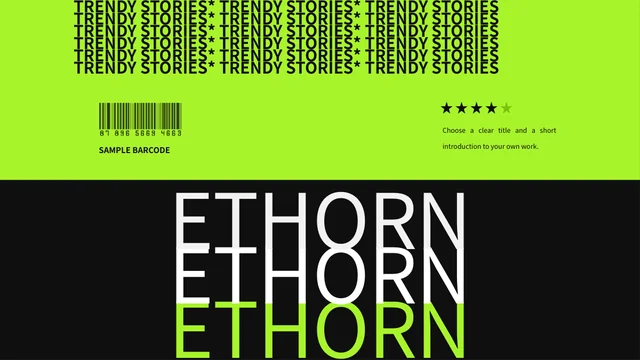
Ethorn Presentation Template combines black pages, bright green lettering and red bands with repeated names and large text. Its 35-slide sequence moves from a bold opening to text-led pages, manual figures, picture spaces and device frames. Ethorn Presentation Template has phone and computer layouts for your own screenshots, a four-part SWOT arrangement and one native horizontal bar chart. Global and Europe maps use separate vector shapes; two icon-bank pages follow the thank-you page. In Ethorn Presentation Template, the displayed statistics and currency labels are examples to replace, rather than documented results. The stars are decorative shapes, and the barcode artwork has no verified download function. Ethorn Presentation Template keeps editable text, chart data and the original graphic arrangement in a 16:9 PowerPoint file. Choose a short message, give each page a distinct purpose and check the green type against the dark background before presenting.
Key Features of Ethorn Presentation Template
Repeated type, device frames and editable visual layouts.
Repeated Type and Color Bands
Ethorn Presentation Template layers large repeated type, green accents and red bands on black pages. Keep each new headline short so the repeated type stays readable.
Phone and Computer Frames
Ethorn Presentation Template includes phone and computer frames for screenshots. Fit your own image inside each existing screen area and review its crop at full size.
Four-Part SWOT Layout
Ethorn Presentation Template places strengths, weaknesses, opportunities and threats in four areas. Use concise, evidence-based points that match each heading.
Native Horizontal Bar Chart
Ethorn Presentation Template has one editable bar chart with three series and four categories. Update the linked workbook with your own values and clear labels.
Separate Vector Map Shapes
Ethorn Presentation Template includes global and Europe maps built from vector shapes. Select the regions you need and explain any added figures with a source.
Two Pages of Icons
Ethorn Presentation Template ends with two pages of native icons after the thank-you page. Copy a suitable symbol into your layout and keep its meaning consistent.
How to Use Ethorn Presentation Template
Pick the pages, replace the examples and check the contrast.
-
Choose a Clear Sequence
Review all 35 pages of Ethorn Presentation Template. Choose text layouts, device frames, SWOT, chart or map pages that serve your outline; keep the final icon-bank pages as an editing resource.
-
Replace Text, Screens and Data
Download Ethorn Presentation Template with an active paid plan. Save a working copy, replace the sample wording and screen images, then update chart values and any manual statistics separately.
-
Check Contrast and Export
Read Ethorn Presentation Template from start to finish. Check green text on black pages, labels inside the device frames and map annotations; inspect the exported PDF before sharing the result.
Questions about Ethorn Presentation Template
What does Ethorn Presentation Template contain?
Ethorn Presentation Template contains 35 slides in a 16:9 PowerPoint file. It opens with repeated ETHORN lettering and continues through text layouts, sample figures and device frames. Ethorn Presentation Template also includes a SWOT page, a native horizontal bar chart and global and Europe maps. The thank-you page is followed by two icon-bank pages, so Ethorn Presentation Template is not a 33-slide file. Use those final pages as an editing resource, or remove them from your presentation copy. Ethorn Presentation Template keeps the full original page order in the preview so you can choose your own sequence.
Can I edit the lettering in Ethorn Presentation Template?
Ethorn Presentation Template uses ordinary text objects for its headlines and supporting copy. Open a working copy of Ethorn Presentation Template in PowerPoint and replace the examples with your own message. The repeated lettering and narrow color bands make short titles particularly useful. In Ethorn Presentation Template, check each text box after changing its font or wording; a longer phrase may require smaller type or a different page. Ethorn Presentation Template uses decorative stars and a barcode image as part of its visual design. Those elements do not establish a customer rating or a verified download destination.
How do the device layouts in Ethorn Presentation Template work?
Ethorn Presentation Template includes separate phone and computer frames for placing a screenshot or other picture. In Ethorn Presentation Template, the blank or patterned screen spaces are layout examples, rather than functioning apps or interactive devices. Insert an image that matches your actual material and inspect the edges inside the frame. Ethorn Presentation Template does not automatically build a website or generate a product interface. Keep important text large enough to see when the full page is shown. When using Ethorn Presentation Template, describe what your screenshot demonstrates without implying an endorsement from a device manufacturer.
Is the chart in Ethorn Presentation Template editable?
Ethorn Presentation Template contains one native horizontal bar chart with three series and four categories, linked to an embedded workbook. Use PowerPoint’s data editor to replace its sample values and labels. The separate large figures elsewhere in Ethorn Presentation Template are ordinary text; changing the chart workbook will not update them. In Ethorn Presentation Template, check the category order, units and legend after entering your data. The chart is supplied with examples, not verified measurements. Before sharing Ethorn Presentation Template, compare the displayed bars with your own source and review the page at presentation size.
Can I recolor the maps in Ethorn Presentation Template?
Ethorn Presentation Template has a global map and a Europe map made from many separate vector shapes. Work on a copy of Ethorn Presentation Template, select the required shapes and use consistent colors for regions that have the same meaning. The currency labels beside the Europe map in Ethorn Presentation Template are manual examples; they are not a live economic feed. Replace or remove them unless they match information you have checked. Ethorn Presentation Template does not establish a factual claim about a country. Add a clear source and date when your own map communicates figures or comparisons.
How should I fill in the SWOT page in Ethorn Presentation Template?
Ethorn Presentation Template provides four areas for strengths, weaknesses, opportunities and threats. Decide which points belong to each category before filling the text areas. In Ethorn Presentation Template, distinguish an internal capability from an external condition and use evidence for any claim you keep. The original spelling of the strengths and threats labels is corrected in the downloadable copy. Ethorn Presentation Template still supplies a starting layout, rather than a completed analysis of a real organization. After editing Ethorn Presentation Template, read the four areas together and remove repeated points or statements that do not fit their heading.
Which fonts does Ethorn Presentation Template use?
Ethorn Presentation Template uses Source Han Sans SC Regular and Bold in the final downloadable copy, with no font files embedded. Install these fonts before editing Ethorn Presentation Template, or choose a substitute and inspect every text box. Ethorn Presentation Template has large repeated lettering and narrow bands where a font change can alter line breaks. The device captions need a separate check at presentation size. Keep an editable copy of Ethorn Presentation Template, then inspect the exported PDF for missing characters, clipped labels and changes to the chart or map text.
How do I download Ethorn Presentation Template?
Ethorn Presentation Template is available to members with an active paid plan. Sign in, return to this page and use the PPTX download button. Paid members can download Ethorn Presentation Template without a daily limit, including repeat downloads. Review all 35 preview pages before choosing the file. Save a copy of Ethorn Presentation Template before replacing the text, device pictures and chart values, especially if you want to try several arrangements. Ethorn Presentation Template is a PowerPoint file, so obtaining it does not require starting a new presentation with an AI generator.
What should I check before sharing Ethorn Presentation Template?
Ethorn Presentation Template needs a final check of its text, screen pictures, chart labels and map annotations after editing. Remove any sample statistics that do not describe your own work. Read Ethorn Presentation Template at the size your audience will see it, with particular attention to green text and smaller device-screen details. Ethorn Presentation Template does not add a licence for the original design or its sample assets. Follow the applicable source terms and use material you are entitled to share. Send the Ethorn Presentation Template page link when someone needs to preview or obtain their own copy.