Current Iridescent Presentation Template: Pink Gradients, Iridescent Capsules and Six Clear Chapters
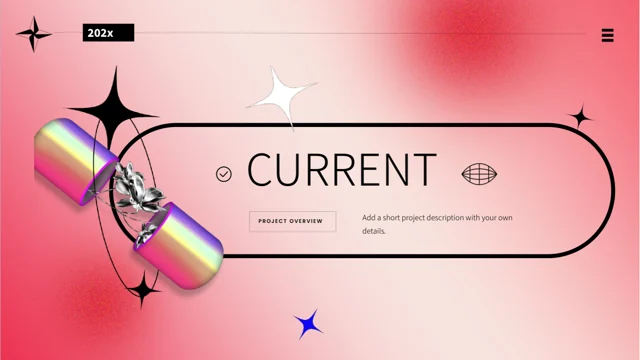
Current Iridescent Presentation Template combines soft pink backgrounds with glossy capsules, floating spheres and silver flower branches. A thin black capsule outline surrounds CURRENT on the cover, and the closing page returns to the same composition with THANKS. Across 20 widescreen slides, Current Iridescent Presentation Template organizes six sections around matching white chapter pages. The contents spreads six topics on either side of a central floral form. Inside, numbered notes, comparison areas and short process diagrams offer different ways to present a project. Current Iridescent Presentation Template includes a three-row native table, a five-point arc, four ascending steps and a four-part ring. Four metric cards provide sample figures rather than connected performance data. Keep your explanations brief, replace example labels and use the diagrams to show a sequence or relationship that your audience can follow.
Key Features of Current Iridescent Presentation Template
Glossy decoration, short notes and a six-part presentation structure.
Pink Covers and Silver Branches
Current Iridescent Presentation Template frames its cover and closing page with pink gradients and silver branches. Keep the main title short inside the capsule outline.
Six Matching Chapter Dividers
Current Iridescent Presentation Template uses six white chapter pages with iridescent capsules. Rename the headings and keep their order aligned with the contents.
Native Table and Numbered Notes
Current Iridescent Presentation Template includes a three-row native table and six numbered notes. Replace sample entries with concise details your audience can compare.
Arc and Staircase Processes
Current Iridescent Presentation Template offers a five-point arc and four ascending steps. Use their order to explain stages; the shapes are not linked to a spreadsheet.
Four-Part Ring and Metric Cards
Current Iridescent Presentation Template pairs a four-part ring with separate metric cards. Replace the example figures and label what each value measures.
Floating Spheres and Lettered Cards
Current Iridescent Presentation Template mixes floating spheres with lettered cards and fine rules. Keep descriptions brief so decorative objects do not compete with text.
How to Use Current Iridescent Presentation Template
Choose a sequence, replace sample details and check the complete presentation.
-
Choose Your Six Topics
Preview all 20 pages of Current Iridescent Presentation Template. Select the sections you need, then align the contents, divider headings and numbered notes with your project sequence.
-
Download and Replace Examples
Get Current Iridescent Presentation Template with an active paid plan; daily and repeat downloads are unlimited. Edit a copy, replace sample figures and fill the table with your own details.
-
Check Text and Diagrams
Review Current Iridescent Presentation Template at presentation size. Check the capsule title, small table entries and diagram labels, then compare the exported file with your edited slides.
Questions About Current Iridescent Presentation Template
How do I download Current Iridescent Presentation Template?
Sign in with an active paid plan to download Current Iridescent Presentation Template. Daily and repeat downloads are unlimited. Save the supplied Current Iridescent Presentation Template and make a separate working copy. Begin by deciding what your audience should understand at the end of the presentation. The six-part structure in Current Iridescent Presentation Template can organize a project from its introduction through supporting details to a conclusion. Choose the most useful pages in Current Iridescent Presentation Template before writing longer explanations. Replace the sample headings and notes in Current Iridescent Presentation Template with specific information rather than filling every box simply because it is available. Use Current Iridescent Presentation Template as a visual framework for your own material. Its decorative objects and example figures do not provide evidence for business claims or indicate that a particular workflow has already been completed.
How many slides are in Current Iridescent Presentation Template?
Current Iridescent Presentation Template contains 20 slides in a 16:9 format. The pink cover in Current Iridescent Presentation Template leads to a six-topic contents page, followed by chapter dividers on pages 3, 6, 9, 12, 15 and 18. Each divider in Current Iridescent Presentation Template repeats the capsule motif on a white background. The final page of Current Iridescent Presentation Template closes with THANKS and echoes the opening composition. You may shorten Current Iridescent Presentation Template by removing sections that your audience does not need. Update the contents and remaining divider labels together, rather than leaving a six-topic list for a shorter presentation. Numbering in Current Iridescent Presentation Template provides visual order; it does not require six equally long chapters. Give important points enough space while keeping repeated supporting details brief.
Can I edit the table and diagrams in Current Iridescent Presentation Template?
Current Iridescent Presentation Template includes one native table on page 8. Replace its three rows with your own concise entries and check the column widths in Current Iridescent Presentation Template after adding longer words. No native charts or embedded spreadsheet workbooks are supplied with Current Iridescent Presentation Template. The five-point arc, ascending steps, ring and other illustrated arrangements in Current Iridescent Presentation Template are diagram layouts, not spreadsheet-linked visualizations. Label their stages or categories clearly before presenting them. The four metric cards in Current Iridescent Presentation Template contain the sample values 100%, 85M, 584 and 2,500. They are not verified project results or PPT AI statistics. When editing Current Iridescent Presentation Template, replace each figure with a supported value and add a clear description of its meaning. Check every label independently when a diagram contains several separate text areas.
Can I preview every page of Current Iridescent Presentation Template?
The gallery displays all 20 pages of Current Iridescent Presentation Template. Move through the thumbnails and arrow controls to compare the cover, contents, six dividers and supporting layouts. Enlarge Current Iridescent Presentation Template to inspect the smaller table entries and text around the ring diagrams. The previews of Current Iridescent Presentation Template show the supplied file rather than your own edits. Before adding text to Current Iridescent Presentation Template, compare the length of your proposed notes with the available space. Some pages in Current Iridescent Presentation Template use several compact areas, so a short phrase may be more effective than a paragraph. After editing, review Current Iridescent Presentation Template from beginning to end at presentation size. Check both the more decorative pink pages and the quieter white dividers, including the closing slide and any small labels near the page edges.
Are the glossy objects in Current Iridescent Presentation Template editable 3D models?
Current Iridescent Presentation Template uses iridescent capsules, floating spheres, a silver branch and other glossy decorative imagery. These objects in Current Iridescent Presentation Template create a dimensional appearance; they are not supplied as editable 3D models. Keep their proportions when adapting Current Iridescent Presentation Template, and avoid stretching a sphere into an unintended oval. The stepped and circular arrangements in Current Iridescent Presentation Template are presentation graphics rather than interactive controls. The small menu-like symbol on the cover of Current Iridescent Presentation Template is part of the design, not a working navigation feature. You can change the surrounding text in Current Iridescent Presentation Template while keeping the original visual balance. If you replace a decorative image, use material suited to the available space and verify its permitted use. Check that fine black rules and short labels remain readable against the new background.
Which fonts does Current Iridescent Presentation Template use?
Current Iridescent Presentation Template uses Source Han Sans Light and Heavy, Poppins SemiBold and Microsoft YaHei. Some source fonts remain embedded in Current Iridescent Presentation Template, but not every font used by the presentation is embedded. Keep matching fonts available when editing Current Iridescent Presentation Template, especially if your software reports a substitution. Light text and heavier headings create much of the contrast in Current Iridescent Presentation Template, so inspect both styles after adding your own material. The large cover title in Current Iridescent Presentation Template shares its capsule outline with a decorative object; avoid replacing it with a long sentence. Check narrow table cells, numbered notes and date labels throughout Current Iridescent Presentation Template. Review the exported file as well as the editable copy, since text wrapping and font rendering can differ between software and export settings.
Is Current Iridescent Presentation Template in English, and can I use another editor?
The final Current Iridescent Presentation Template contains English headings and short English project guidance. Website translations describe the same Current Iridescent Presentation Template PPTX rather than separate native slide files for each language. Replace its example copy with your own content and inspect any longer translated labels. Other presentation software may import Current Iridescent Presentation Template, but fonts, picture crops, table widths and grouped diagram elements can render differently. Compare an imported Current Iridescent Presentation Template with the gallery, using PowerPoint as the layout reference. Preserve a working copy of Current Iridescent Presentation Template before changing several styles at once. The sample years and date ranges in Current Iridescent Presentation Template are editable examples rather than a statement of current project timing. Update them consistently across the contents, comparison pages and supporting notes before sharing the presentation.
Can I use Current Iridescent Presentation Template commercially?
Check the applicable conditions for Current Iridescent Presentation Template, its decorative images, fonts and any material you add. A paid download does not establish every possible reuse or redistribution right. Use Current Iridescent Presentation Template for an appropriate presentation only after checking the conditions relevant to your intended use. Keep any required credits when adapting Current Iridescent Presentation Template. If you replace an image in Current Iridescent Presentation Template, confirm that you can use the replacement in the same context. Do not present the sample figures or dates in Current Iridescent Presentation Template as verified evidence for your own project. Permission to display a finished presentation and permission to redistribute an editable Current Iridescent Presentation Template file are separate questions. Review those conditions before distributing source files or including the design in another downloadable collection.
How should I share Current Iridescent Presentation Template?
Share this public page when recommending Current Iridescent Presentation Template, so recipients can inspect the complete gallery and download through their own eligible accounts. Keep an editable copy of Current Iridescent Presentation Template for future changes to labels, table entries and project details. Before presenting Current Iridescent Presentation Template, check the six contents topics against the actual sequence and remove sections that no longer serve a purpose. Review every sample date and metric in Current Iridescent Presentation Template, including small entries within grouped diagrams. Run through Current Iridescent Presentation Template on the intended screen to check text size, contrast and the space around decorative objects. Compare the exported Current Iridescent Presentation Template with your working copy, looking for clipped table text, changed font weights and labels that have moved into adjacent shapes. Keep the final message clear on the closing page.