Green Chalkboard Lesson Presentation Template: classroom visuals for your teaching outline
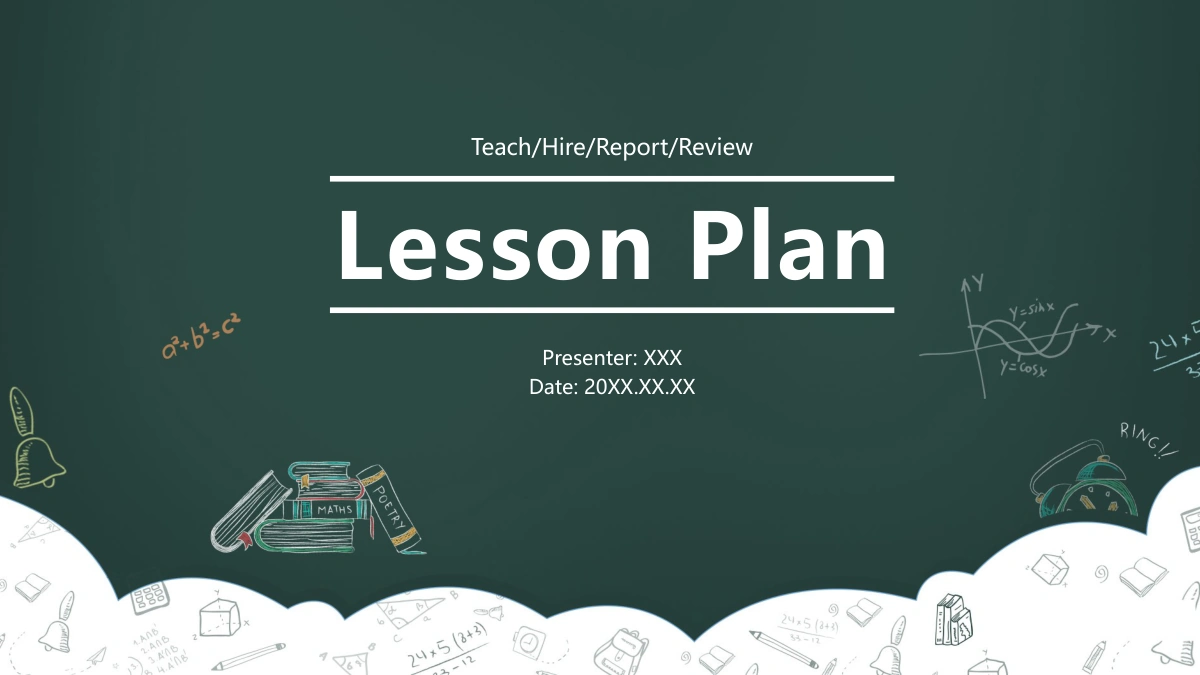
Green Chalkboard Lesson Presentation Template opens on a dark green board with sketched books, bells and mathematics around a white scalloped edge. A wooden sign and four apple outlines introduce the contents. Four matching chapter breaks divide a collection of white layouts with deep green heading bands and muted sage accents. Green Chalkboard Lesson Presentation Template offers a winding month timeline, a five-level pyramid, a balance scale and a segmented lightbulb, giving different ideas their own visual structure. Classroom images and an illustrated campus appear in photo rows and mosaics. Seven native charts sit alongside separate percentage text, while other pages use numbered shapes and people icons. Choose the arrangements that fit your teaching outline, then supply your own lesson objectives and supporting examples. Keep the sample figures separate from verified results, and check that a decorative diagram explains the relationship you intend.
Key Features of Green Chalkboard Lesson Presentation Template
Chalk sketches, classroom imagery and diagrams for a teaching outline.
Chalkboard opening and closing
Green Chalkboard Lesson Presentation Template frames its opening and closing with sketched school supplies. White scallops soften the dark green background.
Apples and four chapter breaks
Green Chalkboard Lesson Presentation Template has four apple contents markers and matching chapter breaks. Give each section a short, distinct teaching purpose.
Classroom and campus layouts
Green Chalkboard Lesson Presentation Template pairs classroom imagery with an illustrated campus. Replace repeated images together to keep photo rows consistent.
Timelines and diagram choices
Green Chalkboard Lesson Presentation Template offers a winding timeline, pyramid, scale and lightbulb. Select the shape that explains your intended relationship.
Seven editable chart examples
Green Chalkboard Lesson Presentation Template includes three ring charts and four horizontal bars. Update the chart data and its separate percentage text together.
Numbered points and comparisons
Green Chalkboard Lesson Presentation Template has numbered circles, cards and people icons. Check sequence labels and symbol meanings against your own examples.
How to Use Green Chalkboard Lesson Presentation Template
Select a teaching sequence, prepare your examples and review the result.
-
Map your teaching outline
Browse the 30 pages of Green Chalkboard Lesson Presentation Template. Assign a purpose to each chapter, then choose classroom images or diagrams that support the point you plan to explain.
-
Download a working copy
Get Green Chalkboard Lesson Presentation Template with an active paid plan. Paid members have unlimited daily and repeat downloads. Keep the original file separate while you edit a working copy.
-
Replace examples and check the display
Edit Green Chalkboard Lesson Presentation Template in PowerPoint. Add your lesson text, replace images where needed, and check chart labels, timeline numbering and the finished screen layout.
Questions about Green Chalkboard Lesson Presentation Template
How do I download Green Chalkboard Lesson Presentation Template?
Sign in with an active paid plan to download Green Chalkboard Lesson Presentation Template as a PowerPoint file. Paid members have unlimited daily downloads, including repeat downloads. Preview Green Chalkboard Lesson Presentation Template before deciding which layouts suit your lesson. Save an original Green Chalkboard Lesson Presentation Template copy before replacing the sample notes. Use a working Green Chalkboard Lesson Presentation Template file for your own teaching material. Green Chalkboard Lesson Presentation Template supplies layouts and examples, so prepare the actual explanation you want your audience to follow.
How many slides are in Green Chalkboard Lesson Presentation Template?
Green Chalkboard Lesson Presentation Template contains 30 widescreen slides in 16:9 format. Its four chapter dividers appear on pages 3, 11, 17 and 25. Green Chalkboard Lesson Presentation Template also includes the opening, apple contents page and matching closing. The content pages of Green Chalkboard Lesson Presentation Template range from diagrams to classroom image mosaics. You can shorten Green Chalkboard Lesson Presentation Template by choosing only the layouts that support your outline. Keep the contents of your Green Chalkboard Lesson Presentation Template copy aligned with the sections you retain.
Can I edit the text and colors in Green Chalkboard Lesson Presentation Template?
Green Chalkboard Lesson Presentation Template includes editable text, shapes and seven native charts. Image pixels in Green Chalkboard Lesson Presentation Template remain part of their pictures rather than separate text boxes. Replace notes in Green Chalkboard Lesson Presentation Template with concise explanations that fit the existing space. Check the separate percentage text when changing chart data in Green Chalkboard Lesson Presentation Template. The six-node timeline originally ends with two 05 labels, and the people icons have no stated scale. Review these examples in Green Chalkboard Lesson Presentation Template before presenting your own sequence or results.
Can I preview all of Green Chalkboard Lesson Presentation Template?
Yes. Green Chalkboard Lesson Presentation Template has a complete gallery of all 30 pages from the English PowerPoint file. Use the Green Chalkboard Lesson Presentation Template thumbnails to compare chapter breaks with the content pages between them. Enlarge Green Chalkboard Lesson Presentation Template to inspect classroom image crops and smaller diagram notes. Check the ring and bar examples in Green Chalkboard Lesson Presentation Template at a readable size. Choose pages from Green Chalkboard Lesson Presentation Template according to their content space, then arrange the layouts around the lesson you want to explain.
Can I open Green Chalkboard Lesson Presentation Template in another editor?
Use a copy of Green Chalkboard Lesson Presentation Template in an editor that supports importing .pptx files. No separate native edition is provided for every application. Compare Green Chalkboard Lesson Presentation Template after import with the approved preview, especially the apple contents markers and diagram shapes. Check the charts in Green Chalkboard Lesson Presentation Template because another editor may draw labels differently. Inspect both an on-screen Green Chalkboard Lesson Presentation Template presentation and any exported PDF. Retain the PowerPoint Green Chalkboard Lesson Presentation Template copy if another application changes the appearance.
Which fonts does Green Chalkboard Lesson Presentation Template use?
Green Chalkboard Lesson Presentation Template uses Microsoft YaHei, Microsoft YaHei Light, SimSun, SimHei, DengXian, Arial, Arial Black, Calibri Light and Impact, including bold styles. No font files are embedded in Green Chalkboard Lesson Presentation Template. Use matching fonts where available, then check line breaks in your Green Chalkboard Lesson Presentation Template copy. Review the compact labels and large section headings in Green Chalkboard Lesson Presentation Template if you choose substitutes. Keep the typography consistent across your edited Green Chalkboard Lesson Presentation Template presentation and inspect any PDF export before sharing it.
Are the slides in Green Chalkboard Lesson Presentation Template translated?
Green Chalkboard Lesson Presentation Template comes as one English PowerPoint file. Its editable titles, notes and section text are in English, and the classroom image lettering has also been replaced with English. All 30 Green Chalkboard Lesson Presentation Template previews show that same file. Choosing another website language changes the Green Chalkboard Lesson Presentation Template page description, rather than creating a separate translated deck. Replace the English sample notes in Green Chalkboard Lesson Presentation Template with your own teaching content. Review the final Green Chalkboard Lesson Presentation Template copy for names, dates and examples that belong to your lesson.
Can I use Green Chalkboard Lesson Presentation Template commercially?
Paid access to Green Chalkboard Lesson Presentation Template provides a download without expanding rights to third-party imagery or fonts. Check the permissions that apply to Green Chalkboard Lesson Presentation Template and any assets you retain. Replace classroom imagery in Green Chalkboard Lesson Presentation Template if permission for your intended use is uncertain. Your own additions to Green Chalkboard Lesson Presentation Template also need appropriate permission. Keep relevant source terms with Green Chalkboard Lesson Presentation Template, and confirm that your teaching examples and figures are suitable for the presentation you intend to distribute.
How do I share Green Chalkboard Lesson Presentation Template?
Share the Green Chalkboard Lesson Presentation Template page link to show the design and its preview. That link does not include edits in your working file. For your finished Green Chalkboard Lesson Presentation Template presentation, send the edited file or an export through a suitable channel. Review the remaining placeholder notes in Green Chalkboard Lesson Presentation Template before sharing. Check dates, names and chart labels in Green Chalkboard Lesson Presentation Template, then inspect the presentation at its intended display size. Keep an editable Green Chalkboard Lesson Presentation Template copy for later changes.