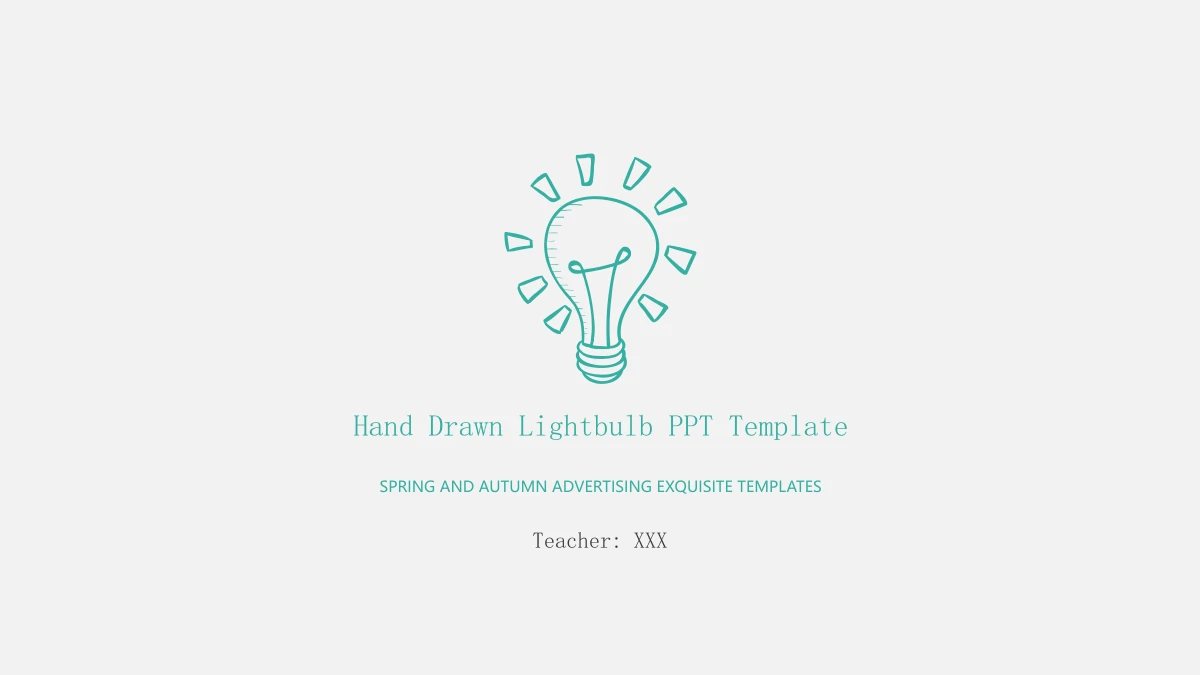
Hand Drawn Lightbulb Presentation Template: Teal Sketches for Your Ideas
Hand Drawn Lightbulb Presentation Template pairs a hand drawn bulb with teal outlines on a light grey background. A paper plane leads into the contents page, followed by four numbered sections and layouts for connected ideas. Hand Drawn Lightbulb Presentation Template offers rough circles, diamond frames, speech bubbles and a branching arrow diagram. A laptop illustration introduces a longer text area, while a four-year line uses editable 20XX placeholders. The rising and falling line is a manual illustration rather than a data chart. Hand Drawn Lightbulb Presentation Template contains 23 slides: 18 main pages and five hidden icon sheets at the end. The eighteenth page repeats the cover. The hidden sheets supply original vector drawings of classroom tools and everyday objects, so you can copy a suitable icon into your working deck. Replace the English prompts with your own outline and examples. Choose clear layouts and let the sketches guide attention.
Key Features of Hand Drawn Lightbulb Presentation Template
Hand Drawn Lightbulb Presentation Template combines editable sketches, connected layouts and five original icon sheets.
Teal Hand Drawn Outlines
Hand Drawn Lightbulb Presentation Template uses rough teal strokes on light grey. Keep this style consistent when adding headings or choosing symbols.
Four Lightbulb Sections
Hand Drawn Lightbulb Presentation Template introduces four sections with large bulbs and numbered dividers. Give each section a short title that fits your outline.
Connected Idea Layouts
Hand Drawn Lightbulb Presentation Template links rough circles and diamond frames with arrows. Add one idea per area and explain how the points relate.
Speech Bubbles and Notes
Hand Drawn Lightbulb Presentation Template offers bubble layouts and a laptop text page. Add brief notes so each drawing has space and the audience can follow.
Manual Line and Year Graphics
Hand Drawn Lightbulb Presentation Template includes a manual line and four 20XX labels. Replace the year placeholders and explain the shapes with accurate notes.
Five Hidden Vector Icon Sheets
Hand Drawn Lightbulb Presentation Template retains five hidden icon sheets after the main slides. Copy native drawings into your deck and keep their groups intact.
How to Use Hand Drawn Lightbulb Presentation Template
Preview Hand Drawn Lightbulb Presentation Template, choose suitable layouts and turn the English prompts into your own presentation.
-
Review the Main and Hidden Pages
Browse all 23 pages of Hand Drawn Lightbulb Presentation Template. Compare the section dividers and connected layouts, then inspect the five hidden icon sheets for drawings that fit your topic.
-
Download a Clean Working Copy
Download Hand Drawn Lightbulb Presentation Template with an active paid plan. Daily downloads are unlimited, including repeats. Keep a clean copy before choosing slides or copying icons.
-
Write Your Notes and Check the Flow
Edit Hand Drawn Lightbulb Presentation Template with your own notes. Replace the 20XX labels and review the manual line, then save the PPTX or export a PDF to share your finished presentation.
Hand Drawn Lightbulb Presentation Template FAQ
How do I download Hand Drawn Lightbulb Presentation Template?
Use an active paid plan to download Hand Drawn Lightbulb Presentation Template. Daily downloads are unlimited, including repeats. Save Hand Drawn Lightbulb Presentation Template as an English PPTX and edit a separate copy. Keep the hidden icon sheets in Hand Drawn Lightbulb Presentation Template available while choosing drawings for your pages.
How many slides does Hand Drawn Lightbulb Presentation Template contain?
Hand Drawn Lightbulb Presentation Template contains 23 slides in 16:9: 18 main pages and five hidden icon sheets on pages 19–23. Dividers appear on pages 3, 7, 11 and 15. Page 18 of Hand Drawn Lightbulb Presentation Template repeats the cover. The hidden pages in Hand Drawn Lightbulb Presentation Template stay outside a normal slide show until you unhide them.
Can I edit the text and drawings in Hand Drawn Lightbulb Presentation Template?
The English text and native drawings in Hand Drawn Lightbulb Presentation Template are editable, including grouped bulbs and individual icons. Hand Drawn Lightbulb Presentation Template has no linked workbook or native data chart. Page 13 uses a manual line illustration. Work on a copy of Hand Drawn Lightbulb Presentation Template and check grouped objects before changing colors or resizing them.
Can I preview every page of Hand Drawn Lightbulb Presentation Template?
The gallery shows all 23 pages of Hand Drawn Lightbulb Presentation Template, including the hidden icon sheets. Enlarge the bubble layouts to judge text space and compare the branching diagram with the circular sequence. The preview of Hand Drawn Lightbulb Presentation Template also shows the repeated cover. Inspect the final asset pages of Hand Drawn Lightbulb Presentation Template to choose useful drawings before downloading.
Will Hand Drawn Lightbulb Presentation Template work in another presentation editor?
An editor that supports PPTX may import Hand Drawn Lightbulb Presentation Template. Check native paths, grouped icons and hidden page flags. Keep the original Hand Drawn Lightbulb Presentation Template while testing your app, and compare the thin teal strokes and text wrapping with the preview. Export your finished Hand Drawn Lightbulb Presentation Template presentation as a PDF if you need a fixed layout for distribution.
Which fonts does Hand Drawn Lightbulb Presentation Template use?
The final English text in Hand Drawn Lightbulb Presentation Template uses SimSun Regular and Microsoft YaHei Regular. Fonts are not embedded. Choose matching faces or available replacements. After changing fonts in Hand Drawn Lightbulb Presentation Template, check the cover, contents heading and narrow diagram labels. Review every main page of Hand Drawn Lightbulb Presentation Template because wider letters can change line breaks.
Does changing the website language translate Hand Drawn Lightbulb Presentation Template?
The language selector translates the website description of Hand Drawn Lightbulb Presentation Template. All versions download the same English PPTX. Editable prompts and master text in Hand Drawn Lightbulb Presentation Template are English. The original advertising line and native symbols remain. To translate Hand Drawn Lightbulb Presentation Template itself, edit the text in your working copy and check the spacing in each original frame.
Can I use Hand Drawn Lightbulb Presentation Template for commercial presentations?
Review the terms for Hand Drawn Lightbulb Presentation Template and any material you retain. Paid access supplies no additional rights to third-party artwork or brands. Hand Drawn Lightbulb Presentation Template keeps original file identity and the Spring and Autumn Advertising line. The Windows mark remains on a hidden icon sheet. Check permissions for additions before distributing your edited Hand Drawn Lightbulb Presentation Template.
How do I share Hand Drawn Lightbulb Presentation Template?
Use the share buttons on the Hand Drawn Lightbulb Presentation Template page or copy its page URL. Others can preview Hand Drawn Lightbulb Presentation Template; downloading requires their own active paid plan. Share your finished notes as an edited PPTX or PDF according to the applicable terms. The Hand Drawn Lightbulb Presentation Template page link shows the template, while your saved file contains your own presentation.