Red Facade Business Presentation Template: Four Parts Framed by Red Architecture
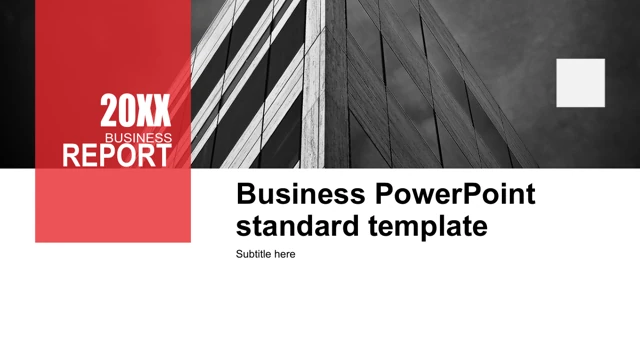
Red Facade Business Presentation Template starts with a grayscale building facade and a translucent red panel. Four numbered divider pages in Red Facade Business Presentation Template return to that architectural image, giving the 23-slide sequence a clear rhythm. Between them, Red Facade Business Presentation Template places rice terraces, mountains, food, office scenes and desk photographs beside short explanations. These varied pictures are sample assets rather than evidence about a particular business. Red Facade Business Presentation Template includes hexagonal and triangular photo groups, circular pictures, paired text cards and a tablet-style composition. A dark page in Red Facade Business Presentation Template sets four icon-led points beneath a wide office photograph. Later layouts in Red Facade Business Presentation Template present three numbered items and a red strip containing example figures 35000, 48000, 90% and 85%. Keep their original values until you replace them with your own verified measures. The final data page in Red Facade Business Presentation Template contains a native donut chart with values 6 and 4, shown alongside 60/40 labels. Its embedded workbook remains available; only the source Chinese chart labels were translated. The text and shapes in Red Facade Business Presentation Template remain separate native objects, while photographs need image replacement to change their pictured content. Latin filler and unrelated source text in Red Facade Business Presentation Template were shortened to English editing prompts. Source promotion, notes and author metadata were cleared, and the closing website credit was removed. All original images and slide coordinates in Red Facade Business Presentation Template were preserved. Preview the full Red Facade Business Presentation Template before editing, then check photo crops, short headings and every sample figure in a working copy.
Key Features of Red Facade Business Presentation Template
Facade dividers, photo groups and a small data finish.
Red architectural rhythm
A grayscale facade returns in four numbered divider pages.
Geometric photo groups
Hexagons, triangles and circles organize the original pictures.
Light and dark layouts
White pages alternate with black panels and red accent strips.
Compact point blocks
Paired cards and icon rows give short explanations distinct places.
Example metric strip
A red band shows 35000, 48000, 90% and 85% as sample figures.
Native donut chart
The 6/4 chart keeps its workbook; the nearby labels read 60/40.
How to Use Red Facade Business Presentation Template
Choose the sequence, replace the examples and check the finish.
-
Inspect the 23 pages
Review the photo groups, four dividers and final chart.
-
Download a working copy
Sign in with an active paid plan. Daily downloads are unlimited.
-
Edit and review
Replace prompts and photos. Update chart data and labels together.
Questions about Red Facade Business Presentation Template
How do I download Red Facade Business Presentation Template?
Sign in with an active paid plan, then select Download PPTX for Red Facade Business Presentation Template. The temporary link supplies Red Facade Business Presentation Template as a PowerPoint file. Repeated downloads of Red Facade Business Presentation Template are unlimited each day while the plan is active. Save a separate working copy of Red Facade Business Presentation Template before editing.
How many slides are in Red Facade Business Presentation Template?
Red Facade Business Presentation Template contains 23 slides in 16:9. Four numbered facade dividers organize Red Facade Business Presentation Template, with a matching opening and closing, photo layouts and a final donut. Download Red Facade Business Presentation Template for the complete sequence. You can keep fewer pages in your edited Red Facade Business Presentation Template when the story needs a shorter structure.
Can I edit Red Facade Business Presentation Template?
Red Facade Business Presentation Template retains native text, shapes and a donut chart. Edit the short text blocks and geometric frames in Red Facade Business Presentation Template where they are separate objects. The chart in Red Facade Business Presentation Template has an embedded workbook with source values 6 and 4. If you change those values in Red Facade Business Presentation Template, update the separate 60/40 labels too.
Can I preview all of Red Facade Business Presentation Template?
Yes. The thumbnails and arrows show all 23 pages of Red Facade Business Presentation Template. Enlarge the dark panels, small captions and photo groups in Red Facade Business Presentation Template to check the room available for your material. The gallery presents the supplied Red Facade Business Presentation Template; it does not include changes you later make to Red Facade Business Presentation Template.
Can another editor open Red Facade Business Presentation Template?
A program supporting PPTX may open Red Facade Business Presentation Template, but fonts, grouping, photo crops and the donut can differ. Compare its result with the Red Facade Business Presentation Template preview. Keep a PowerPoint working copy of Red Facade Business Presentation Template before trying another application, and review the complete Red Facade Business Presentation Template after conversion.
Which fonts does Red Facade Business Presentation Template use?
The edited slide text in Red Facade Business Presentation Template uses Arial and Impact. Confirm both fonts are available before adapting Red Facade Business Presentation Template. After a font change, inspect the headings, narrow cards and captions in Red Facade Business Presentation Template. The original text boxes in Red Facade Business Presentation Template retain their positions, so longer wording may need shortening.
Are the slides of Red Facade Business Presentation Template translated?
Red Facade Business Presentation Template is supplied in English. The Chinese chart labels in Red Facade Business Presentation Template were translated, and Latin filler became concise editing prompts. Selecting a website language translates the page about Red Facade Business Presentation Template; it does not change the English file. The sample figures in Red Facade Business Presentation Template remain examples rather than verified results.
Can I use Red Facade Business Presentation Template commercially?
Paid access to Red Facade Business Presentation Template does not establish commercial rights to its source design or photographs. Verify permissions for Red Facade Business Presentation Template and replace uncertain assets. Before distributing an edited Red Facade Business Presentation Template, check the rights for every retained image and the intended use of the file.
How do I share Red Facade Business Presentation Template?
Use the share button or copy the public page link for Red Facade Business Presentation Template so others can examine its gallery. Review the photo permissions, prompts, chart labels and sample metrics in Red Facade Business Presentation Template before distributing your edited version. Keep an editable copy of the finished Red Facade Business Presentation Template alongside any exported PDF.