Green Touch Annual Review Presentation Template: raised circles for a five-part review
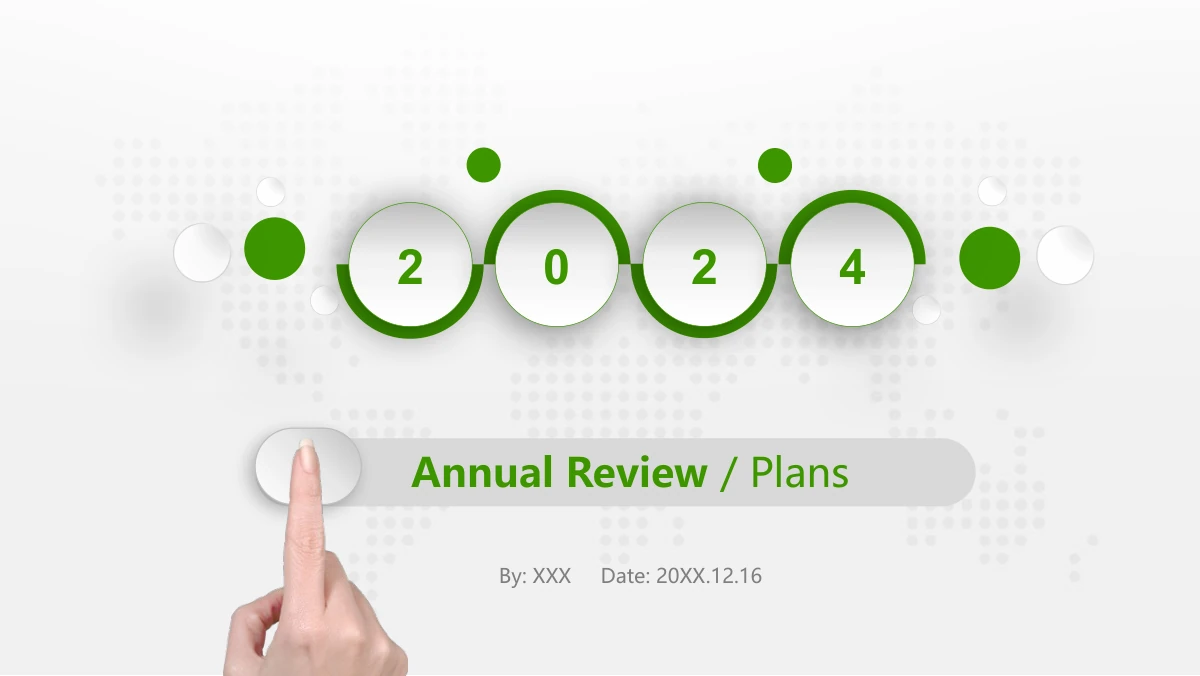
Green Touch Annual Review Presentation Template builds a year-end report around green circles, soft shadows and a pale dotted world map. A fingertip touches the cover label and numbered chapter discs; two pinching hands frame the preface. The 43 pages in Green Touch Annual Review Presentation Template move from an annual overview through completed work, results and problems, improvements and next-year plans. Alternating timelines, rounded cards, photo frames and connected diagrams in Green Touch Annual Review Presentation Template offer different ways to organise evidence. Bars, rings and percentage arrows are manual slide graphics rather than workbook-driven charts. Select the examples that suit your records, then update their labels and shapes together. Green Touch Annual Review Presentation Template also includes team portraits, project photos and a closing page. Keep raised labels concise, replace sample statements and check the photos and figures before presenting your own review.
Key Features of Green Touch Annual Review Presentation Template
A fingertip motif, raised panels and five report chapters.
Touch and Circle Motif
Green Touch Annual Review Presentation Template pairs fingertip photos with raised green discs. A dotted world map and soft shadows connect the pages.
Five Annual-Review Chapters
Green Touch Annual Review Presentation Template separates five parts of an annual review. Revise the contents labels to match the chapters you retain.
Manual Figures and Timelines
Green Touch Annual Review Presentation Template has manual rings, bars and month lines. Update labels and shapes together when replacing sample figures.
Photos Within Device Frames
Green Touch Annual Review Presentation Template uses laptop and tablet photo frames. Check the crop and focal point when inserting your own images.
Cards for Several Viewpoints
Green Touch Annual Review Presentation Template offers team cards, four topic panels and six-note layouts. Choose the structure that suits your evidence.
Connected Planning Layouts
Green Touch Annual Review Presentation Template links circles, hexagons and chevrons. Their relationships can explain priorities and the sequence of work.
How to Use Green Touch Annual Review Presentation Template
Choose the evidence, rebuild the examples, then present.
-
Select Your Five-Part Story
Browse Green Touch Annual Review Presentation Template and outline your annual review. Keep the chapter breaks that support your story, then remove layouts that repeat the same evidence.
-
Update Photos and Manual Figures
Add your findings, photographs and dates to Green Touch Annual Review Presentation Template. Update figures and their related rings, bars and arrows; changing a number does not rebuild shapes.
-
Check the Presentation Copy
Rehearse Green Touch Annual Review Presentation Template on your intended display. Check the contents, timeline labels and photo crops, then inspect an export before sharing your review.
Green Touch Annual Review Presentation Template FAQ
How do I download Green Touch Annual Review Presentation Template?
Download Green Touch Annual Review Presentation Template with an active paid plan. There is no daily download limit, and you can download the same file again. Before choosing Green Touch Annual Review Presentation Template, compare its five-part outline with the review you need to deliver. The opening note, work overview and next-year plan can frame a management update; the project photos and team cards are optional. Sign in and use the download control on this page to obtain Green Touch Annual Review Presentation Template as a PPTX. Save an untouched copy of Green Touch Annual Review Presentation Template so that you can recover a deleted timeline or chapter break. Select the pages of Green Touch Annual Review Presentation Template for their role in your report rather than keeping all 43 simply because they are supplied.
How many pages are in Green Touch Annual Review Presentation Template?
Green Touch Annual Review Presentation Template contains 43 pages, including a cover, preface, contents, five chapter dividers, report layouts and a closing page. The dividers in Green Touch Annual Review Presentation Template appear on pages 4, 12, 23, 30 and 38. They organise the annual overview, completed work, results and problems, improvements and next-year plans. There is no need to use every layout in Green Touch Annual Review Presentation Template. A short review might retain one timeline and a few evidence cards; a detailed report can add the comparisons and project photos in Green Touch Annual Review Presentation Template. The cover carries a sample 2024 date. Check the year, contents and sequence after adapting Green Touch Annual Review Presentation Template, and give each remaining page a clear purpose in the report.
Can I edit the wording and colours in Green Touch Annual Review Presentation Template?
Editable text boxes and native shape fills in Green Touch Annual Review Presentation Template can be changed in PowerPoint. Start with the five contents labels and chapter headings, then replace the placeholder notes in Green Touch Annual Review Presentation Template. The manual bars, rings and arrows in Green Touch Annual Review Presentation Template do not have a chart workbook: revise their shapes as well as their numbers. Keep the comparison units clear, because some examples show totals in tens of thousands while the later revenue graphic specifies yuan. Colours within the photographs and world-map image in Green Touch Annual Review Presentation Template require separate image editing. Try a new green on one raised panel first, check text contrast, then apply a consistent palette to the rest of Green Touch Annual Review Presentation Template.
Can I preview every page of Green Touch Annual Review Presentation Template?
Review all 43 pages of Green Touch Annual Review Presentation Template in the gallery before downloading. Use the thumbnail sequence to compare the five chapter breaks with the contents page, then enlarge the layouts that need the most detail. Green Touch Annual Review Presentation Template includes both month-by-month examples and shorter note cards; choose the structure that suits your evidence. Look closely at the manual percentage graphics in Green Touch Annual Review Presentation Template, because their labels and shapes need to be updated together. Compare device-frame crops and small timeline notes at presentation size. The previews of Green Touch Annual Review Presentation Template show the downloadable English deck. Select a concise sequence from Green Touch Annual Review Presentation Template instead of retaining every page.
Can I open Green Touch Annual Review Presentation Template in another slide editor?
Green Touch Annual Review Presentation Template is supplied as a PPTX, but identical appearance in every editor has not been verified. Import a small selection first: the fingertip cover, a shadowed note card, the laptop photo and one connected diagram. These test different kinds of objects in Green Touch Annual Review Presentation Template before you commit to importing the whole review. Compare the crops, line breaks and shadows in Green Touch Annual Review Presentation Template with the gallery. Keep an original copy of Green Touch Annual Review Presentation Template available if the receiving editor changes a group or shape. The source MP3 has not been played or tested, so a successful import does not establish audio playback. Check any sound you plan to use in Green Touch Annual Review Presentation Template separately on the presentation device.
Which fonts does Green Touch Annual Review Presentation Template use?
The verified previews of Green Touch Annual Review Presentation Template use Arial, Arial Narrow, Arial Rounded MT Bold, Arial Unicode MS, Calibri, Impact and Microsoft YaHei. Two star symbols in Green Touch Annual Review Presentation Template render with Hiragino Maru Gothic Pro. The file does not include embedded fonts, so check font availability before editing Green Touch Annual Review Presentation Template on another computer. If a replacement is needed, choose a font you are licensed to use and compare line breaks with the Green Touch Annual Review Presentation Template gallery. Pay attention to the small month labels, narrow arrows and raised cover title bar in Green Touch Annual Review Presentation Template. Test a saved copy before sharing Green Touch Annual Review Presentation Template; a PDF export can help preserve the appearance of a finished audience version.
Is the text in Green Touch Annual Review Presentation Template in English?
Green Touch Annual Review Presentation Template is provided as an English PPTX. Replace its sample headings, notes, dates and presenter fields with the information for your own review. The website translations describe Green Touch Annual Review Presentation Template as the same English file; choosing another website language does not translate the slides automatically. Green Touch Annual Review Presentation Template keeps sample figures and dates so that you can recognise the original examples. Check the cover year, monthly labels and the yuan unit on the revenue page of Green Touch Annual Review Presentation Template before presenting. Photographs remain visual assets rather than editable text boxes. The retained MP3 has not been translated or tested for playback. Review the finished Green Touch Annual Review Presentation Template from start to finish, including any hidden content you choose to reuse.
Can I use Green Touch Annual Review Presentation Template for a commercial report?
Confirm that your source permissions and the rights to the assets you retain cover the intended use of Green Touch Annual Review Presentation Template. Paid download access does not establish unlimited commercial rights to the photographs, character portraits or audio. For a client report, consider replacing the team portraits and business photos in Green Touch Annual Review Presentation Template with approved company assets. Keep any attribution or conditions for material you retain in Green Touch Annual Review Presentation Template. Do not infer permission from the editable format of Green Touch Annual Review Presentation Template or from the removal of a promotional placeholder. Resolve any licensing gap before distributing the finished work. The sample statements and figures in Green Touch Annual Review Presentation Template also need to be replaced with information that you are authorised to present.
How should I share a report made with Green Touch Annual Review Presentation Template?
Assemble an audience copy of Green Touch Annual Review Presentation Template containing the evidence and plan you intend to discuss. Remove unused team cards and repeated timelines, then check that the five contents labels in Green Touch Annual Review Presentation Template still match the chosen sections. For a review that needs no editing, export the selected pages of Green Touch Annual Review Presentation Template and inspect the small notes, manual figure labels and device-frame crops. Share an editable Green Touch Annual Review Presentation Template file only when collaborators need it and your permissions allow that form of distribution. Tell them which diagrams require manual updates instead of workbook changes. Keep confidential figures and unused source placeholders out of the shared copy of Green Touch Annual Review Presentation Template, and test any audio independently before the meeting.