Vintage Street Portfolio Presentation Template: warm photo layouts in four chapters
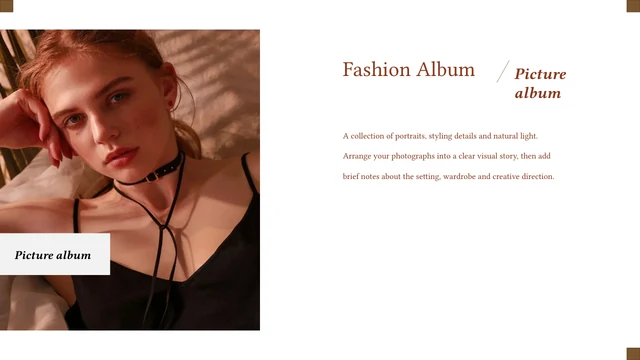
Vintage Street Portfolio Presentation Template arranges 15 widescreen slides around street photographs, beige blocks and brown lettering. A café photograph opens the sequence; the closing page returns to the same scene with a Thanks title. Vintage Street Portfolio Presentation Template has a four-part index and matching chapter dividers, each pairing a narrow street image with a wide caption panel. Inside the chapters, tall photographs sit beside landscape views, small image groups and short passages. Vintage Street Portfolio Presentation Template leaves white space between these elements, so the pictures remain distinct even when several share a page. Replace them with titles that suit your collection and write captions that describe your own photographs. Vintage Street Portfolio Presentation Template includes English sample copy, a corrected portfolio cover and editable picture objects. Review the full preview to choose a clear order for your images.
Key Features of Vintage Street Portfolio Presentation Template
Warm colors, street photographs and four chapter breaks.
Warm neutral palette
Vintage Street Portfolio Presentation Template pairs beige panels with brown lettering and white space. Keep the same accents when changing captions or photographs.
Four-part structure
Vintage Street Portfolio Presentation Template has an index and four matching chapter pages. Rename the parts and group your images into a clear sequence.
Portrait and landscape pairs
Vintage Street Portfolio Presentation Template pairs tall photos with wider street views. Replace pictures within their frames, then check the subjects and crops.
Small photo collections
Vintage Street Portfolio Presentation Template has groups of two or three photos. Choose related images and use the spacing to connect them without crowding.
Concise caption areas
Vintage Street Portfolio Presentation Template places short notes beside photos and color blocks. Replace the travel examples with concise captions about your work.
Editable English copy
Vintage Street Portfolio Presentation Template uses English sample text, Times New Roman and Arial. Update the headings and captions, then check their line breaks.
How to Use Vintage Street Portfolio Presentation Template
Preview the chapters, download and build your photo story.
-
Choose your sequence
Review the 15 pages of Vintage Street Portfolio Presentation Template. Compare chapter breaks, paired views and small photo groups. Choose layouts that give your pictures a clear order.
-
Download a working copy
Sign in with an active paid plan to download Vintage Street Portfolio Presentation Template. Daily downloads, including repeats, are unlimited for paid members. Save a copy before editing.
-
Replace and review
Open Vintage Street Portfolio Presentation Template in PowerPoint. Replace photos and captions; rename the chapters and check crops. Export a PDF to review and keep the editable PPTX.

Questions about Vintage Street Portfolio Presentation Template
How do I download Vintage Street Portfolio Presentation Template?
Use the download button for Vintage Street Portfolio Presentation Template beside the preview after signing in with an active paid plan. Vintage Street Portfolio Presentation Template is supplied as a PowerPoint PPTX file. Paid members have unlimited daily downloads, including repeat downloads. Save Vintage Street Portfolio Presentation Template to your device and make a separate working copy for each collection.
How many slides does Vintage Street Portfolio Presentation Template contain?
Vintage Street Portfolio Presentation Template contains 15 slides in 16:9. They include a cover, an index, four chapter dividers, photographic layouts and a closing page. You can omit pages from Vintage Street Portfolio Presentation Template when a smaller selection presents your work more clearly.
Can I edit the text and colors in Vintage Street Portfolio Presentation Template?
Yes. Titles and sample passages in Vintage Street Portfolio Presentation Template are text objects; you can also change colors and replace picture objects. A photograph remains a single image, so details within it are not separate shapes. Check Vintage Street Portfolio Presentation Template after changing captions or crops.
Can I preview all of Vintage Street Portfolio Presentation Template before downloading?
Yes. The gallery shows every page of Vintage Street Portfolio Presentation Template. Choose a thumbnail or use the arrows to review the full sequence of Vintage Street Portfolio Presentation Template. Enlarge Vintage Street Portfolio Presentation Template to inspect the small captions, narrow portrait images and spaces between photographs.
Can I use Vintage Street Portfolio Presentation Template in another editor?
Vintage Street Portfolio Presentation Template uses the PowerPoint PPTX format. Another editor may import Vintage Street Portfolio Presentation Template, but fonts, image crops and text wrapping can change. Compare the imported Vintage Street Portfolio Presentation Template with the preview before presenting. PowerPoint is the preferred starting point for editing the file.
Which fonts does Vintage Street Portfolio Presentation Template use?
The English download of Vintage Street Portfolio Presentation Template uses Times New Roman for serif text and Arial for the cover. Source Chinese font references were adapted for the English copy; fonts are not embedded. Use installed fonts and review headings and captions throughout Vintage Street Portfolio Presentation Template.
Is the text in Vintage Street Portfolio Presentation Template translated?
The Chinese portfolio label in Vintage Street Portfolio Presentation Template is now English, and the cover caption has a corrected spelling. The other sample copy in Vintage Street Portfolio Presentation Template is English, and photographs and page order are retained. Website translations describe the same English Vintage Street Portfolio Presentation Template; they do not create separate translated PPTX files.
Can I use Vintage Street Portfolio Presentation Template commercially?
The source for Vintage Street Portfolio Presentation Template does not include a verified commercial redistribution license. Paid membership grants download access, not additional rights to the photographs or source material. Confirm permission for your use of Vintage Street Portfolio Presentation Template and replace images you are not authorized to use.
How should I share Vintage Street Portfolio Presentation Template?
Use the share controls to send a link to the Vintage Street Portfolio Presentation Template preview. For a finished collection, share an exported PDF or a presentation using material you have permission to use. Keep an editable copy of Vintage Street Portfolio Presentation Template; recipients need their own eligible account to download the original Vintage Street Portfolio Presentation Template file.