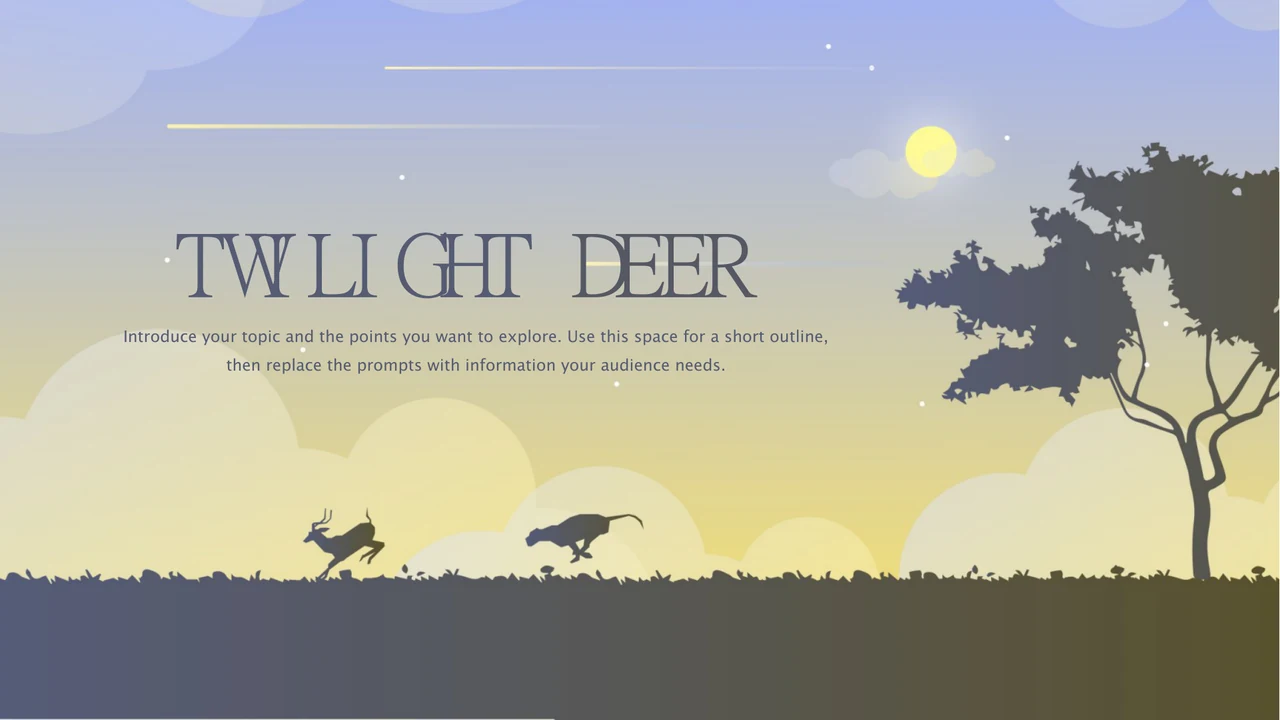
Twilight Deer Presentation Template: woodland silhouettes and a soft twilight sky
Twilight Deer Presentation Template blends a blue-grey to soft-yellow sky with stars and deer. A woodland horizon and running animals frame the opening and closing. Twilight Deer Presentation Template follows four sections: Overview, Ideas, Details and Next Steps. Yellow circles mark the contents and dividers. Twilight Deer Presentation Template highlights a deer filled with forest-and-star imagery and another with tree-like antlers. Deer columns, four linked icons, diamond cards and a dark panel frame your explanations. A phone frame pairs branching antlers with three numbered notes. Twilight Deer Presentation Template keeps editable text, circles, panels and picture objects; the background and animal illustrations remain image assets. Icons suggest topics rather than verified data, with no native charts or linked workbooks. Choose useful pages from the 19 widescreen slides, replace the English prompts with accurate content and keep titles short beside the detailed antlers.
Key Features of Twilight Deer Presentation Template
Soft skies, branching antlers and room for clear explanations.
Twilight Woodland Background
Twilight Deer Presentation Template uses a blue-grey sky fading toward yellow, with a wooded horizon and a bright orb. Keep titles clear of the tree silhouette.
Forest and Star Deer
Twilight Deer Presentation Template pairs forest-and-star deer artwork with branching antlers. Both remain images, rather than separate painted shapes.
Four Numbered Sections
Twilight Deer Presentation Template has four contents topics and matching yellow-circle dividers. Rename Overview, Ideas, Details and Next Steps together.
Three Deer Columns
Twilight Deer Presentation Template repeats three deer silhouettes above text columns. Add one point per column and check the headings against the numbered markers.
Connected Icon Notes
Twilight Deer Presentation Template connects four circular icons in a square, with notes around them. Explain relationships; the layout is not a linked data chart.
Framed Explanations
Twilight Deer Presentation Template has a dark rounded panel for two notes and a phone frame with three points. Keep text clear of white deer and branching antlers.
How to Use Twilight Deer Presentation Template
Choose the sequence, replace the prompts and check the pictures.
-
Choose a Clear Sequence
Review all 19 pages of Twilight Deer Presentation Template. Match the four sections to your outline. Select deer columns, icon notes or framed pages and prepare accurate details before writing.
-
Download and Add Your Content
Download Twilight Deer Presentation Template on an active paid plan; daily and repeat downloads are unlimited. Keep the original, open a PowerPoint copy and replace prompts with verified details.
-
Check and Share Your Presentation
Test Twilight Deer Presentation Template on your intended screen. Review titles, picture crops, fonts and contrast. Check the PDF and image permissions, then keep an editable copy for updates.
Questions about Twilight Deer Presentation Template
How do I download Twilight Deer Presentation Template?
Sign in with an active paid plan and use the download button beside the preview to get Twilight Deer Presentation Template. Paid members have unlimited daily and repeat downloads. Save an original copy of Twilight Deer Presentation Template before changing headings or prompts. The download is an English PowerPoint PPTX retaining native text, shapes and picture objects. Work in a separate Twilight Deer Presentation Template copy so you can compare the four sections and illustrated layouts with the starting file.
How many slides does Twilight Deer Presentation Template contain?
Twilight Deer Presentation Template contains 19 slides in 16:9: a cover, contents, four dividers, twelve content pages and a closing. Overview, Ideas, Details and Next Steps are sample section names. Twilight Deer Presentation Template combines deer illustrations with columns, diamond cards, connected icons and framed notes. Select only relevant pages of Twilight Deer Presentation Template for your presentation. Update the contents and numbered dividers after reordering Twilight Deer Presentation Template; the finished deck need not contain all nineteen slides.
Can I edit text and colours in Twilight Deer Presentation Template?
Yes. Edit native text, circles, cards, outlines and panels in Twilight Deer Presentation Template with PowerPoint. The sky, forest silhouettes and deer artwork remain image assets rather than separate painted shapes. Replace images in Twilight Deer Presentation Template only with material you may use, then check crops and layering. Twilight Deer Presentation Template has no native charts or linked data workbook. The small STATUS caption is an editable English label covering a source image caption; keep it aligned if moving that icon.
Can I preview every page of Twilight Deer Presentation Template?
Yes. The gallery shows every page of the same English Twilight Deer Presentation Template supplied for download. Use thumbnails, arrows or enlargement to compare the four dividers, deer columns, icon groups and closing. Inspect Twilight Deer Presentation Template near the branching antlers, narrow headings and small circular markers. Match Twilight Deer Presentation Template to your outline before writing paragraphs; detailed illustrations need space around them. Keep the original widescreen ratio when reviewing the file on the intended presentation screen.
Will Twilight Deer Presentation Template work in another editor?
A program with PPTX import may open Twilight Deer Presentation Template, but text wrapping, fonts, transparent images and layered objects can change. Compare the imported Twilight Deer Presentation Template with the gallery and PowerPoint. Pay attention to the tree-like antlers, white deer, picture crops and the small STATUS overlay. Test an exported PDF of Twilight Deer Presentation Template before sharing. Keep an editable Twilight Deer Presentation Template copy to repair import changes; matching file format alone does not guarantee identical display.
Which fonts does Twilight Deer Presentation Template use?
Twilight Deer Presentation Template retains slide references to 汉仪尚巍手书W, Lucida Sans Unicode, 阿里巴巴普惠体 M, 等线 and 思源黑体 CN Bold. Eleven original embedded parts cover 微软雅黑, 汉仪尚巍手书W, Lucida Sans Unicode, 方正萤雪简体, 阿里巴巴普惠体 M, Calibri and its variants, 义启小魏楷 and 等线. Source references also include Calibri Light and Arial; the STATUS overlay uses Arial. An editor may substitute unsupported faces in Twilight Deer Presentation Template. Check titles, dividers and narrow notes throughout Twilight Deer Presentation Template after font changes.
Are the slide texts in Twilight Deer Presentation Template English?
Yes. Chinese headings and repeated Latin placeholders in Twilight Deer Presentation Template become concise English headings and editing prompts. Overview, Ideas, Details and Next Steps guide the four parts. The original image caption on one business icon is covered by a native English STATUS label; the underlying image remains unchanged. Every website language describes the same English Twilight Deer Presentation Template PPTX, with no separate translated decks. Replace prompts in Twilight Deer Presentation Template with your own accurate details and review the closing before presenting.
Can I use Twilight Deer Presentation Template commercially?
Commercial-use and redistribution permission for the source of Twilight Deer Presentation Template has not been verified. The source creator field is blank; that does not establish permission or public-domain status. Paid access to Twilight Deer Presentation Template supplies the file, not extra rights in its design, artwork or fonts. Confirm the necessary permissions and preserve genuine credits. Deer artwork and business icons in Twilight Deer Presentation Template are examples, not research evidence. Use authorised material and verified information before distributing a finished presentation.
How do I share Twilight Deer Presentation Template?
Use the page share controls or copy its URL to send the preview of Twilight Deer Presentation Template. Recipients can inspect all nineteen pages and download under their own eligible paid accounts. For an edited Twilight Deer Presentation Template, replace prompts and private information, confirm image and redistribution rights, then export and inspect a PDF or final presentation. Check every section number, caption and closing message. Keep editable Twilight Deer Presentation Template separately for updates and test the finished Twilight Deer Presentation Template on the intended screen.