Van Gogh Brush Art Presentation Template: Painting Backgrounds, Brush Frames and Artwork Studies
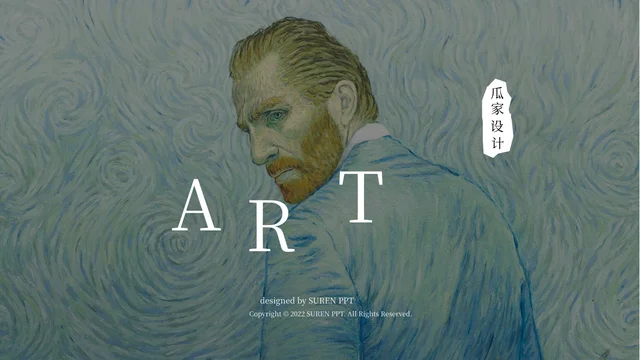
Van Gogh Brush Art Presentation Template pairs painting backgrounds with white brush marks, deep blue scenes and bright yellow panels. Van Gogh Brush Art Presentation Template opens with a self-portrait and a clipped portrait introduction, then uses four brush-outline dividers. Van Gogh Brush Art Presentation Template offers circular observation steps, a light-and-dark comparison and paired artwork views. Sunflower pages use angular white strips and yellow brush panels; a wheat-field image shares space with a side note. A brush-shaped column chart and a doughnut chart retain editable workbooks for your own example data. The late timeline combines short biographical entries with space for a verified event. Keep captions brief against detailed paintings, check contrast and update chart labels after editing. The closing page places thanks beside a painted circle on a dark background. Use the layouts for focused art discussion, adding reliable artwork details and your own observations.
Key Features of Van Gogh Brush Art Presentation Template
Painting-led pages, textured frames and concise artwork observations.
Painting Backgrounds and Portraits
Van Gogh Brush Art Presentation Template opens with a self-portrait and a clipped portrait page. Keep introductions brief against the detailed painting backgrounds.
Four Brush-Outline Chapters
Van Gogh Brush Art Presentation Template uses four dividers with painted circle, square and triangle outlines. Match chapter labels to your discussion sequence.
Light and Dark Comparisons
Van Gogh Brush Art Presentation Template pairs light and dark versions of an image and offers side-by-side artwork views. Add brief notes about color and contrast.
Yellow Sunflower Layouts
Van Gogh Brush Art Presentation Template combines sunflower images with yellow panels and angular white strips. Keep notes short and preserve flower shapes.
Two Native Charts with Workbooks
Van Gogh Brush Art Presentation Template retains a brush-shaped column chart and a doughnut chart with workbooks. Replace sample values and check category labels.
Timeline and Painted-Circle Closing
Van Gogh Brush Art Presentation Template includes a timeline and a dark thank-you page with a painted circle. Verify new dates and check captions before sharing.
How to Use Van Gogh Brush Art Presentation Template
Choose your artwork discussion, update the examples and review the final pages.
-
Plan Your Artwork Discussion
Preview all 23 pages of Van Gogh Brush Art Presentation Template. Choose painting views, comparison layouts and note panels, then organize your topic across the four chapter dividers.
-
Download and Edit Your Copy
Download Van Gogh Brush Art Presentation Template with an active paid plan; daily and repeat downloads are unlimited. Save a copy, add artwork notes and update both chart workbooks.
-
Review Details and Contrast
Check Van Gogh Brush Art Presentation Template at full size. Review captions, timeline entries and chart labels against the paintings, then compare exported pages with your editable copy.
Questions About Van Gogh Brush Art Presentation Template
How do I download Van Gogh Brush Art Presentation Template?
Sign in with an active paid plan to download Van Gogh Brush Art Presentation Template. Daily and repeat downloads of Van Gogh Brush Art Presentation Template are unlimited. Van Gogh Brush Art Presentation Template is supplied as an editable PowerPoint file. Save an untouched copy of Van Gogh Brush Art Presentation Template before replacing painting images, updating chart data or adapting the artwork discussion to your audience.
What does Van Gogh Brush Art Presentation Template include?
Van Gogh Brush Art Presentation Template contains 23 slides in a 16:9 format. Van Gogh Brush Art Presentation Template includes a portrait cover, an artist introduction, four chapter dividers and a dark closing page. The Van Gogh Brush Art Presentation Template body combines artwork comparisons, brush-framed notes, sunflower layouts, a timeline and two native charts. Review every Van Gogh Brush Art Presentation Template preview to select layouts that fit the images and observations you intend to discuss.
How are the chapters in Van Gogh Brush Art Presentation Template organized?
Van Gogh Brush Art Presentation Template uses chapter dividers on pages 3, 8, 13 and 18. The Van Gogh Brush Art Presentation Template dividers combine Roman numerals with white brush-outline shapes over painting backgrounds. Give each Van Gogh Brush Art Presentation Template chapter a clear topic, such as a group of works or a visual theme. Reorder the supporting Van Gogh Brush Art Presentation Template pages as needed while keeping the introduction, comparisons and closing in a sequence your audience can follow.
Are the charts in Van Gogh Brush Art Presentation Template editable?
Van Gogh Brush Art Presentation Template retains a native column chart on page 7 and a native doughnut chart on page 15. Each Van Gogh Brush Art Presentation Template chart has an associated workbook for editing its sample data. The brush-shaped columns in Van Gogh Brush Art Presentation Template are part of the chart presentation, not a separate set of statistical claims about the artist. Replace Van Gogh Brush Art Presentation Template sample values and category names, then check the chart labels and any nearby percentage text together.
Can I change the artwork images in Van Gogh Brush Art Presentation Template?
Van Gogh Brush Art Presentation Template uses full-page painting backgrounds, narrow brush-shaped crops and paired artwork views. Choose Van Gogh Brush Art Presentation Template replacement images that suit the available space and the intended discussion. After replacing a Van Gogh Brush Art Presentation Template picture, check its crop, contrast and relationship to text at full size. Add accurate artwork titles and necessary image credits to Van Gogh Brush Art Presentation Template, and avoid presenting the supplied pictures as your own work.
How should I use the biography and timeline in Van Gogh Brush Art Presentation Template?
Van Gogh Brush Art Presentation Template includes a short artist introduction and a timeline with dates and concise notes. Use the Van Gogh Brush Art Presentation Template timeline as a starting layout for a focused discussion, checking any facts you add against reliable references. Keep factual captions in Van Gogh Brush Art Presentation Template distinct from your own interpretation of color, light or brushwork. The Van Gogh Brush Art Presentation Template chart values remain sample presentation data rather than verified biographical or collection statistics.
Which credits appear in Van Gogh Brush Art Presentation Template?
Van Gogh Brush Art Presentation Template retains the source design credits SUREN PPT and 瓜家设计. These Van Gogh Brush Art Presentation Template credits identify the source design and should not be presented as your own identity or endorsement. Keep the Van Gogh Brush Art Presentation Template credits when adapting the file, and add appropriate information for any replacement artwork images you use. Van Gogh Brush Art Presentation Template is an editable art-discussion layout, not evidence that every supplied image has the same ownership or attribution.
Which fonts does Van Gogh Brush Art Presentation Template use?
Van Gogh Brush Art Presentation Template uses Source Han Serif SC Regular for its final text. The Van Gogh Brush Art Presentation Template PowerPoint file does not embed fonts. Install a matching font if your software substitutes another typeface when editing Van Gogh Brush Art Presentation Template. Review Van Gogh Brush Art Presentation Template small artwork captions, Roman-numeral dividers, rotated labels and chart text after font changes, then compare exported pages with the supplied previews.
What should I check before sharing Van Gogh Brush Art Presentation Template?
Review Van Gogh Brush Art Presentation Template artwork captions, chapter numbers and the order of your discussion. Check Van Gogh Brush Art Presentation Template chart values, workbook labels and timeline entries for accuracy and relevance. Inspect Van Gogh Brush Art Presentation Template text contrast over dark paintings, bright yellow panels and narrow brush-shaped areas. Compare exported Van Gogh Brush Art Presentation Template pages with your editable file, including the painted-circle closing, before sharing the presentation.