Vintage Portrait Album Presentation Template: Warm Colors and Expressive Photographs
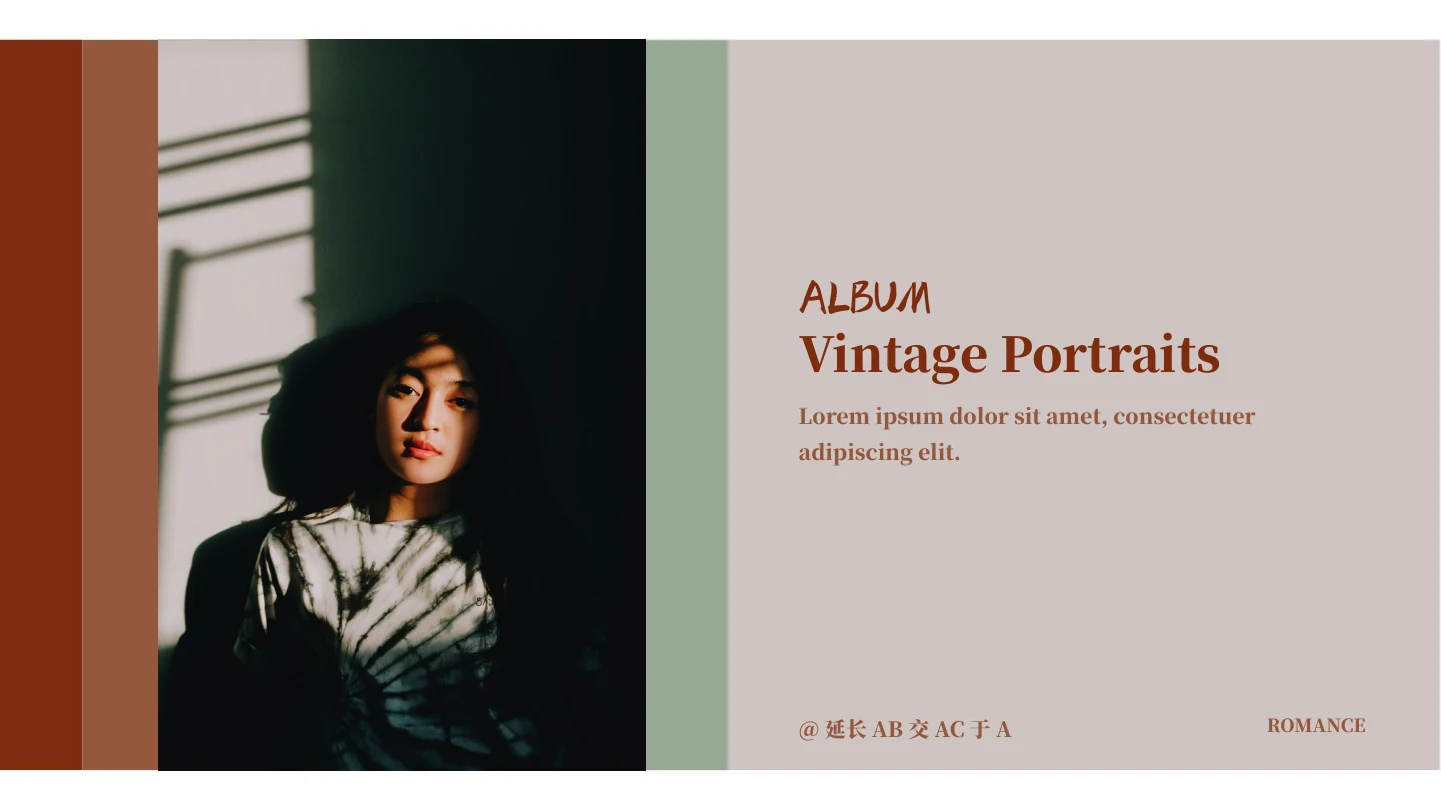
Vintage Portrait Album Presentation Template gives portrait photographs a warm setting through rust red, muted green and pale neutral blocks. Broad borders and simple rectangular panels connect the pages without making every composition identical. Vintage Portrait Album Presentation Template opens with a portrait beside the album title, then introduces three chapters with large faded lettering. Inside, paired pictures alternate with larger photographs and short caption areas. Framed images, vertical titles and offset panels create variety while leaving the photographs prominent. Vintage Portrait Album Presentation Template includes 15 widescreen pages with editable text and separate image objects. Select images that work together, decide where each chapter begins and replace the sample captions with useful context. The cover reads Vintage Portraits; the original Chinese creator signature remains in place alongside the English headings and Latin placeholder copy.
Key Features of Vintage Portrait Album Presentation Template
Discover the color blocks, picture frames and chapter pages in Vintage Portrait Album Presentation Template.
Earthy Color Blocks
Vintage Portrait Album Presentation Template pairs rust red with muted green and pale neutral panels. These recurring colors link photographs with different lighting.
Three Visual Chapters
Vintage Portrait Album Presentation Template introduces three chapters on pages 3, 7 and 11, placing faded oversized lettering beside a full-height portrait.
Paired Portraits
Vintage Portrait Album Presentation Template sets two images side by side or at different heights. Compare crops to keep faces clear inside the original frames.
Framed Photographs
Vintage Portrait Album Presentation Template includes picture borders and shadows on the paired image page, giving the photographs the appearance of displayed prints.
Contrasting Lettering
Vintage Portrait Album Presentation Template combines brush lettering with heavy serif captions. The different letterforms distinguish names, headings and short notes.
Flexible Caption Areas
Vintage Portrait Album Presentation Template offers narrow notes, broad caption panels and a vertical title. Choose the layout that gives each photograph enough space.
How to Use Vintage Portrait Album Presentation Template
Choose your pictures, build the chapters and refine the captions.
-
Review the Photo Layouts
Preview every page of Vintage Portrait Album Presentation Template. Compare the single and paired portraits, then choose the layouts that fit your photographs and the story across three chapters.
-
Download the Album
Use an active paid membership to download Vintage Portrait Album Presentation Template. Daily and repeat downloads are unlimited. Save the supplied file before making a separate copy for your own work.
-
Arrange Your Photographs
Add your photos and captions to Vintage Portrait Album Presentation Template. Keep faces clear of overlapping panels, check the original credits and review every page before exporting the finished album.
Questions About Vintage Portrait Album Presentation Template
How do I download Vintage Portrait Album Presentation Template?
Open the download area for Vintage Portrait Album Presentation Template and sign in with an active paid membership. Eligible members can download repeatedly without a daily limit. Before downloading Vintage Portrait Album Presentation Template, browse the public gallery to check how its portrait frames and caption areas suit your images. Keep the supplied Vintage Portrait Album Presentation Template separate from the copy you edit. All website language versions deliver the same Vintage Portrait Album Presentation Template file.
How is Vintage Portrait Album Presentation Template organized?
Vintage Portrait Album Presentation Template contains 15 slides in a 16:9 widescreen format. The cover and contents lead into three chapters, with a Thanks page at the end. Chapter dividers appear on pages 3, 7 and 11 of Vintage Portrait Album Presentation Template. Between them, single photographs alternate with paired images and more detailed caption layouts. You can shorten Vintage Portrait Album Presentation Template by removing unused pages. Update the contents and section labels in Vintage Portrait Album Presentation Template whenever you change the final order.
Can I replace the pictures in Vintage Portrait Album Presentation Template?
Vintage Portrait Album Presentation Template keeps photographs as separate image objects, with editable shapes and captions around them. Insert your own pictures into a copy of Vintage Portrait Album Presentation Template and inspect their crops after replacement. Some panels in Vintage Portrait Album Presentation Template cross an image edge, so leave space around faces and other important details. A picture with similar proportions will usually need less adjustment. Choose photographs you have permission to use in Vintage Portrait Album Presentation Template and in the album you intend to share.
Can I see all of Vintage Portrait Album Presentation Template before downloading?
The public gallery displays all 15 pages of Vintage Portrait Album Presentation Template in their supplied order. Use the thumbnails and arrow controls to move between the contents, chapter dividers and portrait arrangements. The previews of Vintage Portrait Album Presentation Template show the same English cover title and retained creator signature as the downloadable file. Enlarge Vintage Portrait Album Presentation Template pages with narrow captions before deciding how much text to add. The sample images in Vintage Portrait Album Presentation Template illustrate the layouts; public previews do not provide a separate image licence.
Which editors can open Vintage Portrait Album Presentation Template?
Vintage Portrait Album Presentation Template is a PowerPoint PPTX file with native text, shapes and image objects. Other presentation editors may interpret fonts, shadows and overlapping objects differently. Open a copy of Vintage Portrait Album Presentation Template and compare its pages with the previews before making extensive changes. In Vintage Portrait Album Presentation Template, pay particular attention to the vertical title and the captions that cross photograph edges. Check the exported version of Vintage Portrait Album Presentation Template as well as the editable file so you can catch changed line breaks or crops.
Which fonts are used in Vintage Portrait Album Presentation Template?
Vintage Portrait Album Presentation Template uses Source Han Serif Heavy, listed in the source as 思源宋体 Heavy, and PangMenZhengDao-Cu, listed as 庞门正道粗书体. Font files are not embedded in Vintage Portrait Album Presentation Template. Use matching fonts where permitted and verify the heavy serif captions alongside the brush lettering. A substitute font can change the width of a heading in Vintage Portrait Album Presentation Template even when the point size stays the same. Reopen Vintage Portrait Album Presentation Template after saving and check the cover and chapter names for unexpected wrapping.
Is the slide text in Vintage Portrait Album Presentation Template translated?
The Chinese cover heading in Vintage Portrait Album Presentation Template is translated as Vintage Portraits. Existing English headings and Latin sample paragraphs remain ready for your own wording. Vintage Portrait Album Presentation Template retains the original Chinese creator signature, @延长AB交AC于A, on the cover, chapter dividers and closing page. That signature identifies the creator and is not placeholder copy to remove. Translated descriptions on this website explain Vintage Portrait Album Presentation Template in different languages. They all refer to the same Vintage Portrait Album Presentation Template download, rather than separate translated slide files.
Can I use Vintage Portrait Album Presentation Template for commercial projects?
The permissions for the complete design and sample photographs in Vintage Portrait Album Presentation Template have not been independently verified. Paid download access does not transfer those rights. Before adapting Vintage Portrait Album Presentation Template for client work, confirm the permissions that apply to the design and the photographs you plan to include. Preserve the original creator signature in Vintage Portrait Album Presentation Template and any notices required for your own images. Replacing sample pictures in Vintage Portrait Album Presentation Template does not itself settle the rights to redistribute the underlying design.
How can I share Vintage Portrait Album Presentation Template?
Share the page link for Vintage Portrait Album Presentation Template so others can review the previews and download through their own eligible membership. If you create an album from Vintage Portrait Album Presentation Template, check image permissions and keep required credits before sending your finished work. An exported PDF from Vintage Portrait Album Presentation Template is useful for a fixed viewing layout, but export does not remove copyright obligations. Sharing the complete editable Vintage Portrait Album Presentation Template requires the appropriate redistribution permission; do not assume that paid access includes it.