You Portfolio Presentation Template: art collages and a quiet editorial frame
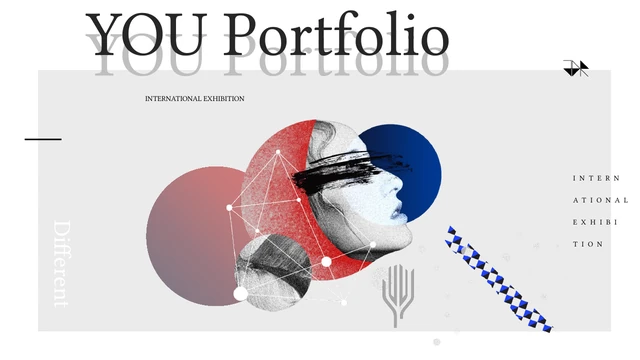
You Portfolio Presentation Template places colourful artwork inside white and light-grey editorial layouts. The cover combines a profile collage with circles and geometric marks; a matching image returns on the closing page. Large layered titles and small captions provide a clear visual contrast. You Portfolio Presentation Template contains 15 widescreen pages. A four-item contents page leads into picture-led layouts featuring classical busts, a visor portrait, paired images, abstract forms and a glowing doorway. Some pages reserve a narrow column for text; others use a wide image beside short notes. You Portfolio Presentation Template retains the original SENYANCHUANGYI@ credit on the closing slide. Replace the English sample text with your own project descriptions. Preview You Portfolio Presentation Template to select pages whose image proportions and text space suit the work you want to show.
Key Features of You Portfolio Presentation Template
Colourful artwork, layered titles and varied image pairings.
A Graphic Opening
You Portfolio Presentation Template uses a portrait collage, circles and geometric marks on the cover. White and grey space frames the art and the layered title.
Four-Item Contents
You Portfolio Presentation Template includes four numbered contents items. Rename them to match your projects, keeping the list consistent with your selected pages.
Portrait Collages
You Portfolio Presentation Template uses colourful busts and a visor portrait as sample pictures. Fit new images to their frames and check crops around key details.
Paired Picture Layouts
You Portfolio Presentation Template pairs pictures on selected pages. Choose related work or contrasting views, then add a short caption to explain their connection.
Abstract Artwork Pages
You Portfolio Presentation Template includes an abstract form on a grid and a glowing doorway image. Introduce a project visually before explaining its details.
Layered Closing Title
You Portfolio Presentation Template closes with a layered Thank You title and the cover collage. Add a next step, retaining the original SENYANCHUANGYI@ credit.
How to Use You Portfolio Presentation Template
Select, personalise and check your portfolio.
-
Preview the Layouts
Browse all 15 pages of You Portfolio Presentation Template before choosing layouts. Compare the image shapes and text areas with your work, then select pages that can tell a clear project story.
-
Download the PowerPoint File
Download You Portfolio Presentation Template with an active paid plan. Keep a working copy of the English PPTX; paid members can download without a daily limit and repeat the same download.
-
Replace Samples and Review
Edit You Portfolio Presentation Template in PowerPoint. Replace sample text and pictures, retain genuine author credit, then check crops, fonts and spacing before exporting the finished deck.
Questions about You Portfolio Presentation Template
How do I download You Portfolio Presentation Template?
Download You Portfolio Presentation Template by signing in with an active paid plan and using the page download control. Paid members have no daily download limit and may download the same file again. Make a working copy of You Portfolio Presentation Template before editing. The download gives you the English PowerPoint file shown in the previews; You Portfolio Presentation Template does not become a new online editing project automatically.
How many slides are in You Portfolio Presentation Template?
You Portfolio Presentation Template contains 15 slides in a 16:9 widescreen format. The gallery keeps the cover, contents, artwork pages and closing in source order. Use You Portfolio Presentation Template as a starting set: keep the pages that support your projects and remove those you do not need. Reordering You Portfolio Presentation Template is fine, but update contents labels and any page references so the finished portfolio remains easy to follow.
Can I edit You Portfolio Presentation Template?
Native text and shapes in You Portfolio Presentation Template can be edited in PowerPoint. Pictures remain image assets, so a collage may not break into individually editable pieces. Replace the English examples in You Portfolio Presentation Template with short descriptions of your own work. Check faces and key details after cropping new images. Changes to You Portfolio Presentation Template should preserve genuine source-author credit rather than presenting the source design as your own.
Can I preview all of You Portfolio Presentation Template?
Yes. Every page of You Portfolio Presentation Template is available in the gallery before downloading. Use thumbnails and the enlarged view to compare picture proportions, text space and the closing layout. Review You Portfolio Presentation Template at your intended screen size, paying attention to small captions. Previewing You Portfolio Presentation Template helps you decide whether to shorten a description, choose another layout or leave a page out.
Can another presentation editor open You Portfolio Presentation Template?
The PPTX format of You Portfolio Presentation Template can be imported by editors that support PowerPoint files. Font substitution, image crops, layered titles and spacing may change after import. Test You Portfolio Presentation Template in your chosen editor before doing extensive work, and keep an untouched original for comparison. Edit You Portfolio Presentation Template in PowerPoint and check every page and exported PDF. Compatibility does not guarantee identical rendering in all apps.
Which fonts does You Portfolio Presentation Template declare?
You Portfolio Presentation Template declares Butler, Lato Light, Lato Black, Source Sans Pro, Titillium, Titillium Light, Alibaba Sans, Alibaba Sans Light, Calibri and Kozuka Mincho Pr6N H. You Portfolio Presentation Template also retains source references to 思源宋体 CN ExtraLight, 思源宋体 CN Heavy, 思源黑体 CN Heavy, 思源黑体 CN Light, 思源黑体 CN Normal, 思源黑体 Heavy and 阿里巴巴普惠体 M. No font files are embedded in You Portfolio Presentation Template. Use properly licensed fonts and check line breaks if your app substitutes them.
Is the downloadable You Portfolio Presentation Template translated?
The downloadable You Portfolio Presentation Template is one English PowerPoint file. Original filler has been replaced with short English editing prompts. The website descriptions of You Portfolio Presentation Template are translated into the supported site languages; choosing another language does not translate the text inside the downloaded slides. Replace the examples with your own language, checking fonts, line breaks and text direction.
Can I use You Portfolio Presentation Template commercially?
Commercial permission for the source design, artwork and fonts of You Portfolio Presentation Template has not been verified. Paid membership provides download access to You Portfolio Presentation Template; it does not establish a commercial licence for every included asset. Keep the original SENYANCHUANGYI@ credit, check relevant permissions and replace images with your own or licensed work as needed.
How should I share You Portfolio Presentation Template?
Share the public You Portfolio Presentation Template page so another person can view the gallery and the download conditions. Share your edited You Portfolio Presentation Template as a PDF or PPTX when the relevant permissions allow it. Check your own project information and image rights, keep genuine source credit, and retain an editable copy for future revisions.