Orange Interior Portfolio Presentation Template: Interior Photography, Burnt Orange Accents and Four Chapters
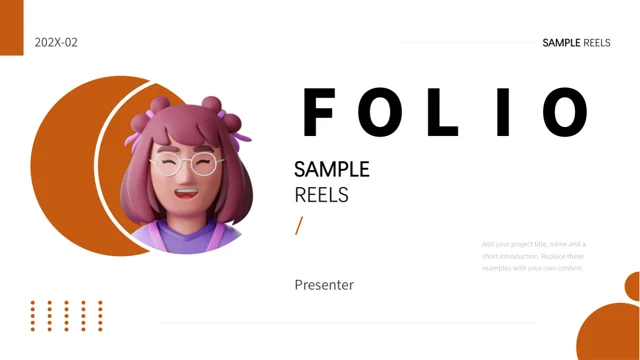
Orange Interior Portfolio Presentation Template uses white space and burnt orange shapes to connect rooms, architectural details and short project notes. A dimensional illustrated avatar introduces the cover, while a building emerging from an open book appears in the closing composition. Across 24 widescreen slides, Orange Interior Portfolio Presentation Template follows four chapters introduced by matching pages with a circular architecture photograph. The layouts move between a full-height room image, paired views, three-photo groups and layered vertical frames. Orange Interior Portfolio Presentation Template also includes overlapping circular crops, two triangular picture areas and four rounded orange cards. Thin rules, numbered circles and small corner dots provide continuity without crowding the photographs. Replace the sample guidance with the purpose of each project and one or two details worth examining. Select views that support the same explanation, and keep furniture, structural lines and other important details visible inside the shaped crops.
Key Features of Orange Interior Portfolio Presentation Template
Architectural views, shaped picture groups and clear project notes.
Burnt Orange Details on White
Orange Interior Portfolio Presentation Template uses orange rings, bars and dots on white pages. Keep notes short so the photography has room to breathe.
Four Architecture Chapter Pages
Orange Interior Portfolio Presentation Template opens four chapters with a circular architecture view. Match divider headings to the contents entries.
Room Views and Photo Comparisons
Orange Interior Portfolio Presentation Template pairs room views with short notes. Choose images that show a clear difference in materials or composition.
Circular and Triangular Crops
Orange Interior Portfolio Presentation Template uses circular and triangular picture crops. Keep furniture edges and structural details clearly visible.
Four Rounded Project Cards
Orange Interior Portfolio Presentation Template offers four rounded orange cards with small pictures. Give each card one point rather than a long history.
Layered Vertical Picture Groups
Orange Interior Portfolio Presentation Template offsets tall picture frames with orange outlines. Keep captions short and the reading order clear.
How to Use Orange Interior Portfolio Presentation Template
Select projects, choose useful views and check every shaped crop.
-
Choose Four Project Topics
Preview all 24 pages of Orange Interior Portfolio Presentation Template. Choose the projects to include, then align the four contents entries, chapter headings and image groups with that sequence.
-
Download and Add Project Notes
Get Orange Interior Portfolio Presentation Template with an active paid plan; daily and repeat downloads are unlimited. Edit a copy and replace sample text with your own project details.
-
Inspect Every Picture Crop
Review Orange Interior Portfolio Presentation Template at presentation size. Check circular and triangular crops, small card notes and headings, then compare the export with your edited file.
Questions About Orange Interior Portfolio Presentation Template
How do I download Orange Interior Portfolio Presentation Template?
Sign in with an active paid plan to download Orange Interior Portfolio Presentation Template. Daily and repeat downloads are unlimited. Keep the supplied Orange Interior Portfolio Presentation Template as a reference and work on a separate copy. Decide which projects belong together before filling the contents page. The four chapters in Orange Interior Portfolio Presentation Template can organize different projects or different aspects of one project, depending on what the audience needs to understand. Choose suitable photographs for Orange Interior Portfolio Presentation Template before writing detailed notes. A room view may introduce a space, while a close architectural view can support a more focused explanation. Replace the sample copy in Orange Interior Portfolio Presentation Template with concise information about your own work. Use Orange Interior Portfolio Presentation Template to organize the presentation rather than treating the included photographs as evidence of projects you personally completed.
How many slides are included in Orange Interior Portfolio Presentation Template?
Orange Interior Portfolio Presentation Template contains 24 slides in a 16:9 format. Its cover and four-entry contents page lead to chapter dividers on pages 3, 8, 14 and 19. Each divider in Orange Interior Portfolio Presentation Template uses a circular crop of the same architectural photograph beside a large chapter number and heading. The remaining pages in Orange Interior Portfolio Presentation Template provide different arrangements for pictures and supporting notes. The last page of Orange Interior Portfolio Presentation Template combines a closing message with a building-and-book image. You can remove or reorder pages in Orange Interior Portfolio Presentation Template to match your chosen portfolio. Update the contents, chapter labels and any references to earlier images at the same time. Keep the repeated orange details in Orange Interior Portfolio Presentation Template consistent enough to connect the sequence, while giving each project its own explanation.
Can I replace the photographs in Orange Interior Portfolio Presentation Template?
Replace the sample images in Orange Interior Portfolio Presentation Template with photographs you are permitted to use. Orange Interior Portfolio Presentation Template includes living spaces, a piano, art-room interiors and architectural details, but those examples do not identify your own projects. Choose new views that fit the composition of Orange Interior Portfolio Presentation Template: tall photos work differently from wide room shots or small circular crops. Review the image edges in Orange Interior Portfolio Presentation Template after replacement, particularly where a triangle cuts across furniture or a circular frame removes the corners of a room. Keep important structural lines and relevant details visible. When presenting comparisons in Orange Interior Portfolio Presentation Template, explain what the audience should notice rather than placing unrelated pictures together. Check the four small photo cards in Orange Interior Portfolio Presentation Template separately, since a useful detail in a large original image can disappear at thumbnail size.
Can I preview every page of Orange Interior Portfolio Presentation Template?
The gallery displays all 24 pages of Orange Interior Portfolio Presentation Template. Use the thumbnails and arrow controls to compare the cover, four chapter dividers and varied picture arrangements. Enlarge Orange Interior Portfolio Presentation Template to inspect the small notes within orange cards and the narrow captions below picture groups. The previews show the supplied Orange Interior Portfolio Presentation Template, not changes you make to a separate copy. Consider the amount of information each page of Orange Interior Portfolio Presentation Template can comfortably hold before choosing it for a project. A three-picture comparison often needs three specific observations rather than one long paragraph. After editing Orange Interior Portfolio Presentation Template, run through the complete sequence at presentation size. Check the opening and closing pages of Orange Interior Portfolio Presentation Template as well as the denser groups, looking for unexpected wrapping, cropped subjects or images that no longer support the adjacent text.
Does Orange Interior Portfolio Presentation Template contain charts or editable 3D models?
Orange Interior Portfolio Presentation Template does not include native charts, tables or embedded spreadsheet workbooks. Its orange circles, numbered labels and four-card arrangement are layout elements rather than linked data displays. The dimensional avatar on the cover of Orange Interior Portfolio Presentation Template is imagery, not an editable 3D character model. Likewise, the architectural photographs in Orange Interior Portfolio Presentation Template are not building models, plans or measured drawings. Use Orange Interior Portfolio Presentation Template to discuss visible design details without implying that the source supplies technical measurements. If you add project figures to Orange Interior Portfolio Presentation Template, verify them and explain their units and scope. The small triangles and dots throughout Orange Interior Portfolio Presentation Template help the composition; they are not interactive navigation controls or evidence of a progress-tracking feature.
Which fonts does Orange Interior Portfolio Presentation Template use?
Orange Interior Portfolio Presentation Template uses Source Han Sans SC Heavy and Normal, together with DengXian. Some source fonts remain embedded in Orange Interior Portfolio Presentation Template, but not all of the fonts used are embedded. Keep matching fonts available when editing Orange Interior Portfolio Presentation Template, and inspect any substitution reported by your presentation software. Large chapter numbers and bold headings sit close together in Orange Interior Portfolio Presentation Template, making unintended wrapping especially noticeable. Use short topic names and avoid squeezing a long sentence into a divider heading. Check the finer notes and small image-card text in Orange Interior Portfolio Presentation Template after adding your own copy. Review both the editable Orange Interior Portfolio Presentation Template and the exported file for changed line breaks, missing characters or labels that move into neighboring shapes. Installing a font does not replace the need to inspect the final layout.
Is Orange Interior Portfolio Presentation Template in English, and can I use another editor?
The final Orange Interior Portfolio Presentation Template contains English headings and short English project guidance. The website translations describe the same Orange Interior Portfolio Presentation Template PPTX; they are not separate native presentations in each language. Replace the sample wording in Orange Interior Portfolio Presentation Template with information about your own projects, and update placeholder dates and presenter details. Other presentation software may import Orange Interior Portfolio Presentation Template, but fonts, layered image frames, grouped shapes and picture crops can change. Compare an imported Orange Interior Portfolio Presentation Template with the gallery and use PowerPoint as the layout reference. Keep a working copy before making broad style changes. If you translate Orange Interior Portfolio Presentation Template into another language, pay particular attention to longer chapter headings and the small notes inside orange cards. Check the exported version independently, even when the editable file appears correct.
Can I use Orange Interior Portfolio Presentation Template commercially?
Check the applicable conditions for Orange Interior Portfolio Presentation Template, the photographs, the cover illustration, fonts and any material you add. A paid download does not establish every possible reuse or redistribution right. Preserve required credits when adapting Orange Interior Portfolio Presentation Template, and verify the permitted use of replacement images. Do not present the source interiors in Orange Interior Portfolio Presentation Template as work you designed or photographed unless that is accurate. Orange Interior Portfolio Presentation Template provides a visual framework, not confirmation of ownership or client approval. If your projects involve confidential information, decide what can be shown before adding it to Orange Interior Portfolio Presentation Template. Permission to display a finished presentation and permission to redistribute an editable Orange Interior Portfolio Presentation Template file are separate matters. Check the relevant conditions before sharing source files or adding the template to another downloadable collection.
How should I share Orange Interior Portfolio Presentation Template?
Share this public page when recommending Orange Interior Portfolio Presentation Template, so recipients can review the gallery and download through their own eligible accounts. Keep an editable copy of Orange Interior Portfolio Presentation Template for later changes to images, captions and project order. Before presenting Orange Interior Portfolio Presentation Template, compare the four contents entries with the actual chapter sequence and remove details that no longer apply. Check that each image group in Orange Interior Portfolio Presentation Template has a clear purpose and that its note describes the correct photograph. Review Orange Interior Portfolio Presentation Template on the intended screen, including the smallest circular crops and the paired triangular views. Compare the exported Orange Interior Portfolio Presentation Template with the working copy to catch clipped text, changed image framing and differences in font weight. Close with a clear message and accurate presenter details rather than leaving sample information in place.