Salvador Dali Art Gallery Presentation Template: Surrealist Images, Grey Gallery Pages and Bold Numbered Notes
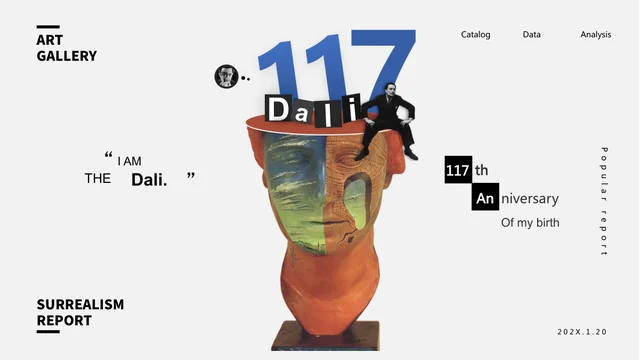
Salvador Dali Art Gallery Presentation Template places colorful art reproductions on quiet grey-white pages, using oversized black numbers and compact labels to organize the viewing experience. A collage cover combines a sculptural face, cutout portraits and a blue 117, while the final page returns to that composition. Across 24 widescreen slides, Salvador Dali Art Gallery Presentation Template moves from a three-topic contents page and portrait introduction into single works, paired comparisons and small image groups. Some pages balance a tall reproduction with a short note; others bring several images into an offset arrangement. Salvador Dali Art Gallery Presentation Template also includes a six-month example row, nine numbered note areas and a page headed TIMELINE with image thumbnails. These are layout examples, not a verified chronology or data charts. Use concise observations and check any artwork title, date or attribution you add. The source anniversary graphics belong to its historical sample design rather than a current event announcement.
Key Features of Salvador Dali Art Gallery Presentation Template
Artwork comparisons, restrained backgrounds and striking black type.
Grey-White Gallery Backgrounds
Salvador Dali Art Gallery Presentation Template sets colorful reproductions against grey-white pages. Keep explanations brief so the artwork remains the focus.
Collage Cover and Closing Page
Salvador Dali Art Gallery Presentation Template returns to a face-and-portrait collage at the end. Treat the 117 anniversary graphic as a historical design example.
Paired Artwork Comparisons
Salvador Dali Art Gallery Presentation Template places works side by side at different scales. Choose a clear comparison and keep important details visible in each crop.
Offset Groups and Small Thumbnails
Salvador Dali Art Gallery Presentation Template groups reproductions with numbered notes. Give each caption a specific image reference to keep the order clear.
Month Row and Nine-Part Notes
Salvador Dali Art Gallery Presentation Template includes six month columns and nine notes. Adapt the labels to your topic; they are not linked data or verified history.
Bold Numbers and Compact Labels
Salvador Dali Art Gallery Presentation Template uses large black numbers beside short headings. Keep new text concise and inspect narrow labels for awkward wrapping.
How to Use Salvador Dali Art Gallery Presentation Template
Choose works to discuss, verify captions and inspect the final presentation.
-
Choose an Artwork Discussion
Preview all 24 pages of Salvador Dali Art Gallery Presentation Template. Select works that support a clear comparison, then align the three contents topics with your chosen sequence.
-
Download and Verify Captions
Get Salvador Dali Art Gallery Presentation Template with an active paid plan; daily and repeat downloads are unlimited. Edit a copy and verify any artwork names, dates or claims you add.
-
Review the Complete Gallery
Inspect Salvador Dali Art Gallery Presentation Template at presentation size. Check image crops, narrow labels and sample dates, then compare the export with your edited slides.
Questions About Salvador Dali Art Gallery Presentation Template
How do I download Salvador Dali Art Gallery Presentation Template?
Sign in with an active paid plan to download Salvador Dali Art Gallery Presentation Template. Daily and repeat downloads are unlimited. Save the supplied Salvador Dali Art Gallery Presentation Template and work on a separate copy. Start with a clear question about the selected images, such as how scale, juxtaposition or an unexpected object affects the composition. Salvador Dali Art Gallery Presentation Template offers single-image and comparison layouts, so choose the page according to the discussion. Write a short caption before filling the supporting note areas in Salvador Dali Art Gallery Presentation Template. Keep observations separate from historical claims that need a reliable source. Use Salvador Dali Art Gallery Presentation Template as a presentation framework rather than as a ready-made scholarly catalog. The sample images and short labels in Salvador Dali Art Gallery Presentation Template do not establish ownership, exhibition authorization or the accuracy of any additional interpretation you bring to the presentation.
How many slides are in Salvador Dali Art Gallery Presentation Template?
Salvador Dali Art Gallery Presentation Template contains 24 slides in a 16:9 format. The collage cover in Salvador Dali Art Gallery Presentation Template leads into a three-topic contents page and a portrait introduction before the gallery arrangements. Salvador Dali Art Gallery Presentation Template alternates large individual reproductions, paired works and smaller groups rather than using four matching chapter dividers. The final slide of Salvador Dali Art Gallery Presentation Template returns to the cover composition with a closing message. You can shorten or rearrange Salvador Dali Art Gallery Presentation Template to support your chosen discussion. Keep the contents labels aligned with the material that remains, and avoid treating the large decorative numbers as a guaranteed chronological sequence. The numbered notes in Salvador Dali Art Gallery Presentation Template are part of its visual organization. They do not by themselves identify an artwork catalog number, an exhibition order or a verified stage of the artist’s career.
Can I replace the artwork in Salvador Dali Art Gallery Presentation Template?
Use reproductions you have permission to display when adapting Salvador Dali Art Gallery Presentation Template. The source includes paintings, a portrait and collage elements related to Salvador Dalí. Salvador Dali Art Gallery Presentation Template places images in tall frames, horizontal pairs and smaller offset groups, so choose replacements with suitable proportions. Check the edges of each crop in Salvador Dali Art Gallery Presentation Template, especially when a small object or a figure is central to your explanation. The brushwork and visible lettering in Salvador Dali Art Gallery Presentation Template are image content, not separate editable slide elements. Keep required attribution and do not present the artwork as your own creation. When replacing images in Salvador Dali Art Gallery Presentation Template, update their captions together. Use Salvador Dali Art Gallery Presentation Template to explain a comparison clearly, without implying that the source artist or a museum endorses your presentation.
Can I preview every page of Salvador Dali Art Gallery Presentation Template?
The gallery shows all 24 pages of Salvador Dali Art Gallery Presentation Template. Use the thumbnails and arrow controls to compare the single-image pages, paired works and numbered image groups. Enlarge Salvador Dali Art Gallery Presentation Template to inspect compact labels and the space between oversized numbers and adjacent headings. Compare the amount of text you plan to use with the available areas in Salvador Dali Art Gallery Presentation Template before editing. A narrow note in Salvador Dali Art Gallery Presentation Template may need a shorter sentence rather than a smaller font. The gallery represents the supplied Salvador Dali Art Gallery Presentation Template, not changes to your own copy. After editing, inspect the full sequence at presentation size. Check the cover and closing composition in Salvador Dali Art Gallery Presentation Template as well as the small thumbnails, making sure the artwork is understandable and the accompanying labels do not wrap into unrelated elements.
Are the timeline and month labels in Salvador Dali Art Gallery Presentation Template historical data?
Salvador Dali Art Gallery Presentation Template includes a six-month row on page 8 and nine numbered note areas on page 14. The page headed TIMELINE in Salvador Dali Art Gallery Presentation Template, on page 21, combines a large image with three thumbnails; it does not provide a verified sequence of dates. Treat these elements in Salvador Dali Art Gallery Presentation Template as layouts for your own researched content. The 117 anniversary and 2021 references in Salvador Dali Art Gallery Presentation Template are part of its historical source design, not a statement that a current anniversary event is taking place. Replace any sample date that does not fit your use of Salvador Dali Art Gallery Presentation Template. No native charts, tables or embedded spreadsheet workbooks are supplied. If you develop a chronology in Salvador Dali Art Gallery Presentation Template, verify each event and date, label the order explicitly and cite the sources required for your context.
Which fonts does Salvador Dali Art Gallery Presentation Template use?
Salvador Dali Art Gallery Presentation Template uses Arial Regular and Bold, Microsoft YaHei, Poppins Regular and SemiBold, and Source Han Sans SC Heavy. Fonts are not embedded in the PPTX. Check the matching fonts on your computer before editing Salvador Dali Art Gallery Presentation Template. Large display numbers sit close to shorter headings, so a substitution can change both the line breaks and the spacing between elements. Compare Salvador Dali Art Gallery Presentation Template with the gallery after adding your own text. Keep narrow captions in Salvador Dali Art Gallery Presentation Template concise instead of shrinking them beyond comfortable reading size. Inspect the cover and closing page of Salvador Dali Art Gallery Presentation Template, where several text elements share the collage composition. Check your working Salvador Dali Art Gallery Presentation Template and its exported version for missing characters, overlapping words or headings that wrap into separate letters. A successful import alone does not confirm that the original layout has been preserved.
Is Salvador Dali Art Gallery Presentation Template in English, and can I use another editor?
The final Salvador Dali Art Gallery Presentation Template uses English headings and sample copy that refers to Lorem Ipsum. This is English placeholder guidance, not a finished account of the artworks. Website translations describe the same PPTX rather than separate native presentations for each language. Replace the sample notes in Salvador Dali Art Gallery Presentation Template with your own observations and verified information. A short visible label is not enough to establish the identity or date of every work. Other software may import Salvador Dali Art Gallery Presentation Template, but fonts, layered cover elements and picture crops can render differently. Compare an imported Salvador Dali Art Gallery Presentation Template with the gallery, using PowerPoint as the reference for layout. Keep a working copy of Salvador Dali Art Gallery Presentation Template before changing text styles. Review Salvador Dali Art Gallery Presentation Template after adding names or longer captions, particularly around large black numbers and narrow labels. Check the exported presentation separately rather than assuming that an editable file and its export will look identical.
Can I use Salvador Dali Art Gallery Presentation Template commercially?
Check the applicable conditions for Salvador Dali Art Gallery Presentation Template, the artwork reproductions, photographs, fonts and anything else you include. A paid download does not establish all reuse or redistribution rights. Salvador Dali Art Gallery Presentation Template is a presentation template, not evidence of a license from the artist’s estate or a museum. Keep required credits in Salvador Dali Art Gallery Presentation Template and verify whether your intended use of each image is permitted. Do not imply that Salvador Dali Art Gallery Presentation Template is an official exhibition publication. Separate your own interpretation from a work’s title, attribution and image credit in Salvador Dali Art Gallery Presentation Template. Familiarity with a painting does not determine the rights covering a particular reproduction. Before redistributing an editable Salvador Dali Art Gallery Presentation Template file, check the relevant distribution conditions separately from permission to display a finished presentation.
How should I share Salvador Dali Art Gallery Presentation Template?
Share this public page when recommending Salvador Dali Art Gallery Presentation Template, so recipients can view all pages and download through their own eligible accounts. Keep an editable copy of Salvador Dali Art Gallery Presentation Template for later changes to captions, comparisons and the order of works. Before presenting Salvador Dali Art Gallery Presentation Template, check the contents labels, sample month row, anniversary references and any dates you added. Make sure the selected image pairs in Salvador Dali Art Gallery Presentation Template have a clear purpose and the smaller groups remain readable. Run through Salvador Dali Art Gallery Presentation Template from the opening collage to the closing page. Review the export for clipped text, overlapping labels and changed crops. Test Salvador Dali Art Gallery Presentation Template on the intended screen and adjust captions that become too small at viewing distance. Keep the distinction between a visual observation and a sourced historical statement clear throughout the presentation.