Abstract Sphere Presentation Template: Textured Forms and White Space
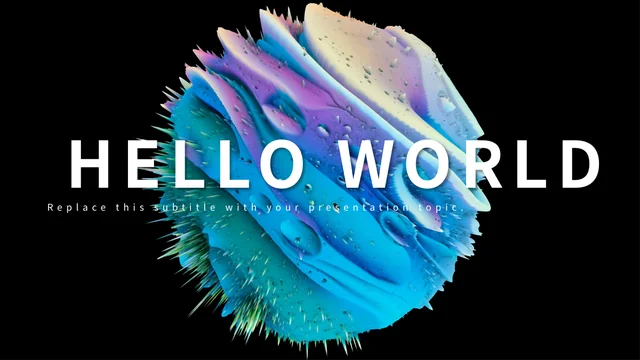
Abstract Sphere Presentation Template pairs spiked sphere images with white pages and dark blue headings. Abstract Sphere Presentation Template contains 22 widescreen slides, moving from a black Hello World cover to four numbered dividers and a Thanks closing. Abstract Sphere Presentation Template includes two- and three-column text pages, photo collages, icon cards and a three-step process. The spheres are pictures with a dimensional appearance, so their surfaces cannot be edited as 3D models. A colorful Einstein portrait is part of a source collage; the image does not establish an endorsement or identify the artwork’s creator. Triangles, a world map and a large number page present manually entered examples, not live chart data. Use these layouts to explain your own ideas, select images with a clear role and verify any quotation you retain. Replace sample figures and label what they measure before sharing.
Key Features of Abstract Sphere Presentation Template
Dimensional-looking pictures, white space and editable diagram shapes.
Textured Sphere Pictures
Abstract Sphere Presentation Template places spiked sphere images on white pages and dark backgrounds. Keep their texture as decoration, with clear text nearby.
Four Numbered Dividers
Abstract Sphere Presentation Template has section breaks on pages 2, 6, 10 and 16. Rename each transition title to introduce the content that follows.
Photo Collage Layouts
Abstract Sphere Presentation Template combines plants, architecture, clocks and a beluga image. Replace the pictures and give each collage one clear purpose.
Column Text and Icon Cards
Abstract Sphere Presentation Template offers two- and three-column text layouts and icon cards. Use short headings and balanced explanations across the columns.
Manual Triangle Comparison
Abstract Sphere Presentation Template shows four triangles with 50%, 86%, 59% and 37% on page 18. Change the labels and shapes to match verified values.
Map and Large Number Pages
Abstract Sphere Presentation Template includes a world map and a large number page. Replace the repeated map values and headline number with properly explained data.
How to Use Abstract Sphere Presentation Template
Select layouts, replace examples and check the finished sequence.
-
Choose Your Sequence
Review all 22 pages of Abstract Sphere Presentation Template. Pick useful dividers, text columns and collage layouts. Give each picture a role and write a short message for every selected page.
-
Download and Replace Examples
Get Abstract Sphere Presentation Template with an active paid plan and unlimited daily downloads. Save a copy, replace headings and figures, and write clear icon-card explanations.
-
Check Figures and Image Meaning
Check Abstract Sphere Presentation Template manual percentages and map labels separately. Verify quotations and image claims, then compare exported pages with the editable copy.
Questions About Abstract Sphere Presentation Template
How do I download Abstract Sphere Presentation Template?
Sign in with an active paid plan to download Abstract Sphere Presentation Template. Daily and repeated Abstract Sphere Presentation Template downloads are unlimited. The Abstract Sphere Presentation Template file is supplied as PowerPoint (.pptx); save a working copy before changing the Hello World cover, transition headings or closing message. Browse the full Abstract Sphere Presentation Template preview to identify pages that suit your outline. Keep an original Abstract Sphere Presentation Template copy as a reference, and use a separate copy for replacing example text, pictures and manually entered numbers. The source slides illustrate layouts rather than provide finished claims about your ideas, services or results.
What is included in the Abstract Sphere Presentation Template sequence?
Abstract Sphere Presentation Template contains 22 original slides in a 16:9 format. Four Abstract Sphere Presentation Template numbered dividers appear on pages 2, 6, 10 and 16, with different sphere pictures around a transition heading. The Abstract Sphere Presentation Template sequence also includes two- and three-column pages, photograph collages, icon-led explanations, a three-step process, manual percentages, a world map and a Thanks closing. Choose only the Abstract Sphere Presentation Template layouts that help you explain your topic. After moving or removing Abstract Sphere Presentation Template pages, rename section headings and check that the opening, dividers and ending support one coherent message rather than the original sample order.
Can I edit the Abstract Sphere Presentation Template spheres as 3D models?
The textured Abstract Sphere Presentation Template spheres are raster images, not editable 3D models. Their dimensional appearance comes from the picture itself; Abstract Sphere Presentation Template does not provide a model surface, material controls or a rotatable object. You can replace an Abstract Sphere Presentation Template picture, resize it or adjust its crop with presentation software, while editable titles and nearby shapes remain separate objects. Keep Abstract Sphere Presentation Template pictures at a suitable aspect ratio and check the image edges after a change. Keep Abstract Sphere Presentation Template sphere textures decorative so they do not compete with small labels or paragraph text. The title, color or shape of an abstract picture does not prove a scientific structure or a physical material.
Are the Abstract Sphere Presentation Template percentage triangles linked to data?
The Abstract Sphere Presentation Template comparison on page 18 uses manually arranged triangle shapes and text, with examples 50%, 86%, 59% and 37% beside Q1–Q4. These Abstract Sphere Presentation Template objects are not a native chart and have no linked workbook that recalculates them. When replacing Abstract Sphere Presentation Template percentages, check the measure, reporting period and a consistent comparison basis. Adjust the triangles separately if their heights need to represent your new values; changing a label alone does not change a shape. Review the Abstract Sphere Presentation Template result for legibility and avoid treating decorative examples as verified performance or as an automatically scaled chart.
How should I replace Abstract Sphere Presentation Template map and number examples?
Abstract Sphere Presentation Template presents a manual world map with three location markers and repeated source values shown as 19,450000. A separate Abstract Sphere Presentation Template page displays the large example 56,790,500. Neither Abstract Sphere Presentation Template layout has a linked spreadsheet or a live data source, so replace each label independently and explain the unit, date and meaning of the figure. If your Abstract Sphere Presentation Template topic has no useful geographic comparison or headline statistic, choose another page instead. Check Abstract Sphere Presentation Template marker placement against your actual region, make the number format consistent and ensure the labels describe your evidence rather than imply unsupported geographic results.
Does the Abstract Sphere Presentation Template portrait or quotation establish an endorsement?
Abstract Sphere Presentation Template includes a colorful Einstein portrait as a source image and a separate quotation layout. The Abstract Sphere Presentation Template file does not identify the portrait artist or verify the quotation’s author and source. Do not turn either into an Abstract Sphere Presentation Template endorsement, verified statement or claim that a pictured person supports your project. If you retain a quotation in Abstract Sphere Presentation Template, check its wording and attribution from a reliable source; otherwise replace it with your own clearly labeled message. Use the portrait as identified illustrative material only where appropriate, review applicable image terms and distinguish the artwork from your own authorship or research.
Which fonts does Abstract Sphere Presentation Template use?
Abstract Sphere Presentation Template uses Source Han Sans SC Regular and Bold, Source Han Serif SC Bold and FontAwesome in the verified English file. No font files are embedded in Abstract Sphere Presentation Template. If an Abstract Sphere Presentation Template font is substituted on your computer, use a properly licensed available replacement and inspect line breaks, large divider numbers and small diagram labels. Check the Abstract Sphere Presentation Template trophy icons as well as ordinary text, since an icon font replacement may change a symbol. Compare the exported slides with the editable file at the intended display size so altered lettering or symbols do not confuse your message.
Can I change Abstract Sphere Presentation Template columns, icons and colors?
Abstract Sphere Presentation Template provides editable text and native shapes alongside sphere pictures and photographs. Rewrite Abstract Sphere Presentation Template two- and three-column pages in comparable text lengths, keeping each short heading connected to its explanation. You can recolor native Abstract Sphere Presentation Template lines, triangles and icon backgrounds while checking contrast against white pages and textured backgrounds. A photo collage remains a set of images; changing a nearby text box does not edit the scene within a picture. After replacing Abstract Sphere Presentation Template content, inspect text wrapping, image crops and icon alignment at the intended screen size. Remove a redundant card or page rather than crowd a useful explanation. The closing Get Started frame in Abstract Sphere Presentation Template is styled text without a working hyperlink.
What should I check before sharing Abstract Sphere Presentation Template?
Review the Abstract Sphere Presentation Template full sequence for sample headings, filler text and unexplained numbers. Check Abstract Sphere Presentation Template manual percentages, triangle heights, map markers and large figures as separate objects, including the unit and period behind each retained value. Verify any quotation and do not invent an artwork creator, photographed location or endorsement for an Abstract Sphere Presentation Template image. Inspect small text, texture contrast and collage crops on your intended display. Compare every Abstract Sphere Presentation Template exported page with the editable file, keep a private working copy and share either a finished export or the appropriate language-specific template page link.