Beige Painting Portfolio Presentation Template: framed paintings and room for your notes
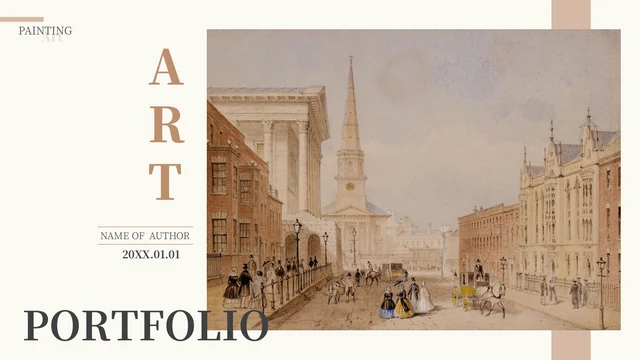
Beige Painting Portfolio Presentation Template pairs warm white pages with beige bands and dark serif headings. Its 15 widescreen slides show street scenes, mountain views and quiet landscapes. Beige Painting Portfolio Presentation Template opens with a painting cover and an author field, followed by a three-part contents page. Match the contents to the work you select. Beige Painting Portfolio Presentation Template alternates chapter dividers with image-and-caption layouts, including a row of three landscapes and a tall painting beside a narrow note panel. Beige Painting Portfolio Presentation Template also contains manually labelled percentages. Replace these examples with verified information rather than treating them as research results. Beige Painting Portfolio Presentation Template supplies an editable English PowerPoint file; painting images remain pictures. Use your own artwork where permission is uncertain, and review the complete preview before downloading.
Key Features of Beige Painting Portfolio Presentation Template
Warm frames and space to discuss your art.
Beige Frames
Beige Painting Portfolio Presentation Template frames paintings with beige rectangles and fine rules. Keep new accents close to this palette so the artwork stays in focus.
Three Chapters
Beige Painting Portfolio Presentation Template has three numbered parts. Rename the chapter headings and match the contents page to the work you choose for each section.
Landscape Comparisons
Beige Painting Portfolio Presentation Template places three landscapes in a row. Use short captions below the pictures to explain a shared theme or a useful difference.
Tall Painting Layouts
Beige Painting Portfolio Presentation Template places tall artwork beside a narrow note panel. Use a brief comment there, then add longer context in the wider text area.
Example Percentages
Beige Painting Portfolio Presentation Template uses manual percentage labels, not native charts. Replace the example figures and explanations with verified information.
Matching Closing Page
Beige Painting Portfolio Presentation Template repeats its street-scene cover on the final page. Update the author field and date on both pages to keep them consistent.
How to Use Beige Painting Portfolio Presentation Template
Choose your artwork, then prepare your presentation.
-
Preview the Layouts
Review all 15 pages of Beige Painting Portfolio Presentation Template. Compare picture sizes and caption boxes with your artwork. Choose a sequence before changing the contents page.
-
Download the PPTX
Get Beige Painting Portfolio Presentation Template while signed in with an active paid plan. Members can download repeatedly without a daily limit. Save a working copy before adding your art.
-
Edit and Share
Replace the examples in Beige Painting Portfolio Presentation Template. Check captions and manual figures, then review text at presentation size. Export the result and keep an editable copy.
Questions about Beige Painting Portfolio Presentation Template
How do I download Beige Painting Portfolio Presentation Template?
You can examine the entire preview of Beige Painting Portfolio Presentation Template before deciding to download. Sign in with an active paid plan and use the download button to obtain the English PPTX. Beige Painting Portfolio Presentation Template is available to paid members without a daily download limit, and repeat downloads are allowed. Save Beige Painting Portfolio Presentation Template in your project folder and edit a separate copy. Sharing the page link gives others access to the preview, while each person uses their own eligible account to download.
How many slides does Beige Painting Portfolio Presentation Template contain?
Beige Painting Portfolio Presentation Template contains 15 slides in a 16:9 format. The contents page lists three parts, with dividers on pages 3, 7 and 11. Beige Painting Portfolio Presentation Template places artwork and caption layouts between those dividers, then returns to its opening street scene on page 15. Your finished Beige Painting Portfolio Presentation Template can use fewer pages. If you remove or rearrange slides, revise the contents and chapter labels so they still describe the sequence. The original Beige Painting Portfolio Presentation Template has no native chart or embedded spreadsheet.
Can I edit the text and colors in Beige Painting Portfolio Presentation Template?
The text boxes, beige shapes and rules in Beige Painting Portfolio Presentation Template remain editable PowerPoint objects. Replace headings and example notes with your own concise explanations. Beige Painting Portfolio Presentation Template stores the paintings as pictures, so details inside a painting cannot be edited as separate text or shapes. Keep image signatures in Beige Painting Portfolio Presentation Template. When adapting Beige Painting Portfolio Presentation Template, replace an entire artwork with an image you may use, check its crop, and review nearby text. The percentage examples are manual labels rather than linked chart data.
Can I preview every page of Beige Painting Portfolio Presentation Template?
Yes. The gallery shows all 15 pages of Beige Painting Portfolio Presentation Template, not just a selection of cover images. Use the thumbnails or arrows to compare the three-part sequence, picture sizes and caption placement. Enlarge Beige Painting Portfolio Presentation Template when checking a tall painting or the three landscapes on page 9. The Beige Painting Portfolio Presentation Template preview corresponds to the English file supplied for download. Before selecting Beige Painting Portfolio Presentation Template, consider whether your own images fit these proportions and how much space your explanations need.
Can I use Beige Painting Portfolio Presentation Template in another presentation editor?
Beige Painting Portfolio Presentation Template is supplied as a PowerPoint (.pptx) file. Another editor that imports PPTX may open it, but support for embedded fonts, crops and text spacing varies. Check Beige Painting Portfolio Presentation Template page by page after importing instead of assuming the layout will remain identical. When checking Beige Painting Portfolio Presentation Template, pay particular attention to the serif headings, narrow note panel and layered beige rectangles. Keep a PowerPoint copy of Beige Painting Portfolio Presentation Template so you can compare the original layout with any imported version before sharing it.
Which fonts does Beige Painting Portfolio Presentation Template use?
Beige Painting Portfolio Presentation Template uses Source Han Serif CN in Light, Medium, Bold and Heavy weights. The actual embedded Bold font is a converted version whose metadata identifies FontCreator, rather than a verified unchanged Adobe release. Beige Painting Portfolio Presentation Template retains the original embedded font data and its OFL notices. These details concern the document fonts and do not grant permission for the paintings. If your editor substitutes a font in Beige Painting Portfolio Presentation Template, review line breaks and narrow text boxes before presenting. Beige Painting Portfolio Presentation Template does not include a separate font download.
Are the slides in Beige Painting Portfolio Presentation Template translated?
The downloadable Beige Painting Portfolio Presentation Template has English editable headings and sample guidance, including its contents and three chapter dividers. Website translations describe that same English PPTX, rather than separate presentation files for every language. Beige Painting Portfolio Presentation Template keeps the original painting images, including lettering or signatures within the pictures. Replace the example author and date before using Beige Painting Portfolio Presentation Template. Your final Beige Painting Portfolio Presentation Template captions should describe your own work or properly attributed material, and you can translate those editable captions for your audience.
Can I use Beige Painting Portfolio Presentation Template commercially?
A paid download of Beige Painting Portfolio Presentation Template does not establish ownership of its paintings or expand third-party permissions. The complete design and image permissions have not been independently confirmed. Beige Painting Portfolio Presentation Template retains artwork markings and the embedded font notices, which apply to the fonts rather than the whole template. Before using Beige Painting Portfolio Presentation Template in commercial work, confirm permission for the material you keep. Replacing the sample paintings with your own authorized images helps you control those rights. Do not attribute the sample artworks in Beige Painting Portfolio Presentation Template to yourself.
How can I share Beige Painting Portfolio Presentation Template?
Use the share controls or copy the canonical page link for Beige Painting Portfolio Presentation Template when you want another person to review the template. The link for Beige Painting Portfolio Presentation Template opens its full public preview. Downloading Beige Painting Portfolio Presentation Template still requires that person to sign in with an active paid plan. For a completed presentation, export a PDF or another format your audience can open, after checking text and picture quality. Keep an editable copy of Beige Painting Portfolio Presentation Template with your project files and retain any artwork attribution required for your material.