Burgundy Portrait Portfolio Presentation Template: Rose Panels and Shadowed Portraits
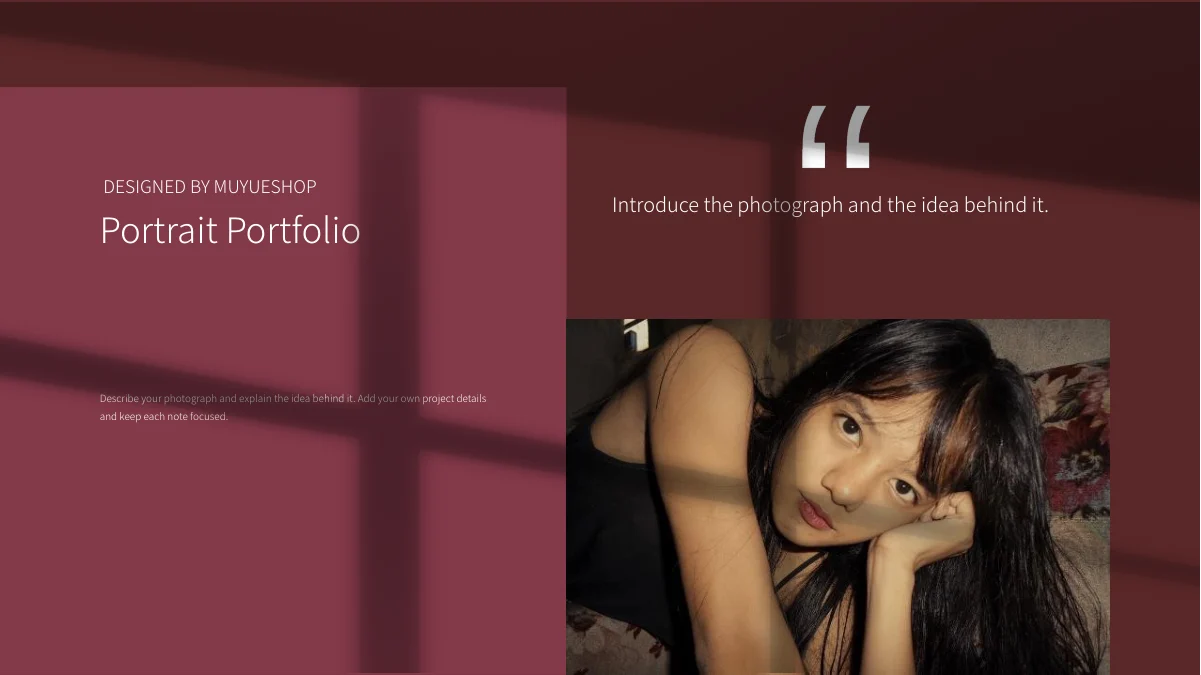
Burgundy Portrait Portfolio Presentation Template pairs deep burgundy backgrounds with muted rose panels and window shadows. Portraits, leafy scenes and a mountain view connect 17 widescreen pages. Burgundy Portrait Portfolio Presentation Template opens with a quotation-style cover and a four-item contents page, then moves through introductions, image previews and detailed photo notes. Burgundy Portrait Portfolio Presentation Template combines a three-portrait row, overlapping picture pairs and narrow photographs beside icon-led captions. A vertical three-point note panel organizes three short talking points. Other pages place greenery and water lilies beside short descriptions. The thanks page echoes the opening arrangement, followed by a separate editing-notes page. Replace sample guidance with accurate project descriptions, adjust each crop around its subject and keep short captions readable against the dark backgrounds. Review the sequence as a complete portfolio before exporting.
Key Features of Burgundy Portrait Portfolio Presentation Template
Rose panels, portrait groups and short photographic notes.
Burgundy and Rose Panels
Burgundy Portrait Portfolio Presentation Template layers rose panels over burgundy backgrounds. Keep pale captions readable when changing colors or adding photos.
Window-Shadow Backgrounds
Burgundy Portrait Portfolio Presentation Template repeats broad window shadows across its pages. Place short captions where the background keeps them readable.
Three-Portrait Image Row
Burgundy Portrait Portfolio Presentation Template arranges three tall portraits on page 7. Choose related pictures and inspect faces along the narrow crop edges.
Icon-Led Photo Notes
Burgundy Portrait Portfolio Presentation Template pairs portraits with circular icons and captions. Use each short note to explain a detail of the nearby photo.
Vertical Three-Point Panel
Burgundy Portrait Portfolio Presentation Template places three linked note markers beside a portrait on page 11. Keep notes concise and ordered around one subject.
Layered Portrait and Nature Images
Burgundy Portrait Portfolio Presentation Template pairs overlapping portraits with greenery and mountain views. Match captions to the images and check covered edges.
How to Use Burgundy Portrait Portfolio Presentation Template
Select related images, update the captions and inspect the shadows.
-
Select a Portfolio Sequence
Preview all 17 pages of Burgundy Portrait Portfolio Presentation Template. Choose introductions, portrait groups and detailed photo notes that suit your work, then put them in a clear sequence.
-
Download and Add Your Work
Download Burgundy Portrait Portfolio Presentation Template with an active paid plan; daily and repeat downloads are unlimited. Save a copy and replace sample guidance with accurate captions.
-
Check Dark Panels and Crops
Inspect Burgundy Portrait Portfolio Presentation Template at full size. Check portrait crops and pale captions against the shadows, then compare the exported pages with your editable copy.
Questions About Burgundy Portrait Portfolio Presentation Template
How do I download Burgundy Portrait Portfolio Presentation Template?
Sign in with an active paid plan to download Burgundy Portrait Portfolio Presentation Template. Daily and repeat downloads of Burgundy Portrait Portfolio Presentation Template are unlimited. Burgundy Portrait Portfolio Presentation Template is provided as an editable PowerPoint file. Keep an untouched copy of Burgundy Portrait Portfolio Presentation Template before replacing photographs, changing captions or adapting the color palette.
What is included in Burgundy Portrait Portfolio Presentation Template?
Burgundy Portrait Portfolio Presentation Template contains 17 slides in a 16:9 format. Burgundy Portrait Portfolio Presentation Template includes a quotation-style cover, contents page, personal introduction layouts, portrait groups and detailed image notes. Page 16 of Burgundy Portrait Portfolio Presentation Template is a thanks page, while the final page contains editing notes. The online gallery shows every Burgundy Portrait Portfolio Presentation Template page so you can select suitable layouts before downloading.
How is Burgundy Portrait Portfolio Presentation Template organized?
Burgundy Portrait Portfolio Presentation Template begins with a four-item contents page and continues through introduction, image-preview and detailed-work layouts. Use the Burgundy Portrait Portfolio Presentation Template contents labels to describe your own selection accurately. Arrange the Burgundy Portrait Portfolio Presentation Template photo pages around the projects you want to explain. Keep the opening and thanks pages of Burgundy Portrait Portfolio Presentation Template consistent with that sequence, and review the separate editing-notes page before sharing.
Can I replace the photographs in Burgundy Portrait Portfolio Presentation Template?
Burgundy Portrait Portfolio Presentation Template uses sample portraits, green foliage, water lilies and a mountain scene. Replace Burgundy Portrait Portfolio Presentation Template images with relevant work while preserving their proportions. Inspect faces and other key details at the edges of Burgundy Portrait Portfolio Presentation Template narrow crops. After replacing a Burgundy Portrait Portfolio Presentation Template picture, review its nearby caption and any overlapping panels, because surrounding objects do not automatically reposition themselves.
How do the icon notes in Burgundy Portrait Portfolio Presentation Template work?
Burgundy Portrait Portfolio Presentation Template pairs small circular icons with short text blocks beside photographs. These Burgundy Portrait Portfolio Presentation Template notes provide places for observations, project context or editing decisions. Page 11 of Burgundy Portrait Portfolio Presentation Template also has three vertically connected markers beside a portrait. Replace the Burgundy Portrait Portfolio Presentation Template sample descriptions with concise statements and keep their order aligned with the subject of the picture.
Which design credit appears in Burgundy Portrait Portfolio Presentation Template?
Burgundy Portrait Portfolio Presentation Template retains the MUYUESHOP design credit from the source. Preserve that attribution when adapting Burgundy Portrait Portfolio Presentation Template and describe your own photographic work separately. The sample portraits in Burgundy Portrait Portfolio Presentation Template do not establish that you created or commissioned those projects. Review the Burgundy Portrait Portfolio Presentation Template author and editing notes alongside your own captions so original attribution remains clear.
Which fonts does Burgundy Portrait Portfolio Presentation Template use?
Burgundy Portrait Portfolio Presentation Template uses Source Han Sans SC Light and Bold, Montserrat Regular and Cormorant SC Regular. Burgundy Portrait Portfolio Presentation Template does not embed fonts. Install matching fonts if Burgundy Portrait Portfolio Presentation Template opens with substitutions, then inspect short headings, small captions and decorative serif lettering. Compare the Burgundy Portrait Portfolio Presentation Template export with the editable copy to catch changed spacing or clipped text.
Can I change the colors in Burgundy Portrait Portfolio Presentation Template?
Burgundy Portrait Portfolio Presentation Template combines dark burgundy fields, rose panels and pale text. Adjust editable Burgundy Portrait Portfolio Presentation Template colors to suit your own photographs while keeping the captions readable. Broad window shadows cross several Burgundy Portrait Portfolio Presentation Template layouts, so inspect small text where light and dark areas meet. Check the Burgundy Portrait Portfolio Presentation Template export at full size after any palette change, especially on pages with overlapping notes and pictures.
What should I check before sharing Burgundy Portrait Portfolio Presentation Template?
Review the contents, picture sequence and thanks page in Burgundy Portrait Portfolio Presentation Template. Check the three-portrait row and overlapping images in Burgundy Portrait Portfolio Presentation Template for cropped faces or covered details. Ensure every Burgundy Portrait Portfolio Presentation Template caption describes its adjacent photograph accurately and that the final editing notes suit your audience. Compare the exported Burgundy Portrait Portfolio Presentation Template pages with the editable file before presenting or sending the portfolio.