Fashion Magazine Portfolio Presentation Template: Portraits, Profiles and Editorial Space
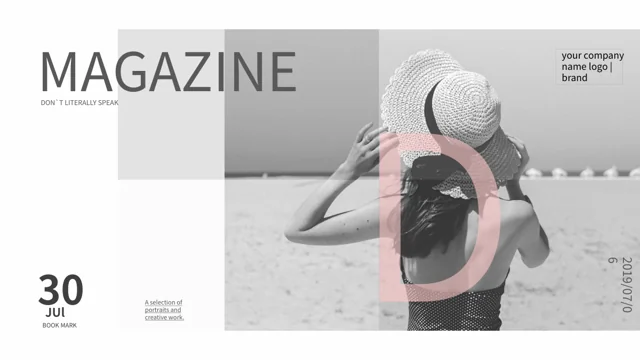
Fashion Magazine Portfolio Presentation Template places fashion portraits within white pages, grey bands and soft pink accents. Fashion Magazine Portfolio Presentation Template includes 18 widescreen slides, opening with a hat portrait and ending with a thank-you page beside a horse photograph. Fashion Magazine Portfolio Presentation Template organizes the sequence with three numbered dividers on pages 3, 8 and 13, along with profile layouts, paired pictures and a three-image collage. Page 12 uses manual 15%, 25% and 35% labels; they are examples, not verified results or linked charts. Page 16 has a portrait composed of vertical image strips. Page 17 shows grayscale and color-overlay techniques, with Chinese editor screenshots. Source Laugh Design credits and a drawn signature remain in the file; they do not identify the pictured people or endorse your work. Replace the profile text, names and dates with checked information, then select pictures that show your actual contribution.
Key Features of Fashion Magazine Portfolio Presentation Template
Fashion portraits, editorial spacing and a practical photo-effects example.
Portraits with Editorial Space
Fashion Magazine Portfolio Presentation Template frames portraits with white space, grey panels and pink accents. Keep each caption close to the image it explains.
Three Numbered Dividers
Fashion Magazine Portfolio Presentation Template has section dividers on pages 3, 8 and 13. Rename them to match your portfolio and keep the sequence coherent.
Profile and Paired-Photo Layouts
Fashion Magazine Portfolio Presentation Template pairs portraits with profile text and a three-image collage. Replace claims with your own verified role and details.
Manual Percentage Examples
Fashion Magazine Portfolio Presentation Template includes 15%, 25% and 35% labels on page 12. Replace numbers and explain what they mean; they are not linked charts.
A Segmented Portrait Image
Fashion Magazine Portfolio Presentation Template shows a portrait in vertical strips on page 16. They form one picture; replace it as a whole, not as separate bars.
Grayscale and Color Overlays
Fashion Magazine Portfolio Presentation Template has a grayscale and color-overlay guide on page 17. Review the static screenshots before adapting your own photos.
How to Use Fashion Magazine Portfolio Presentation Template
Choose a sequence, replace the examples and review each portrait layout.
-
Select Your Portfolio Sequence
Review all 18 pages of Fashion Magazine Portfolio Presentation Template. Choose portraits and layouts for your work, name your contribution and arrange the three sections around a clear story.
-
Download and Replace Examples
Get Fashion Magazine Portfolio Presentation Template with an active paid plan and unlimited daily downloads. Save a copy, replace profile examples and separate source credits from your own work.
-
Check Pictures and Final Output
Check Fashion Magazine Portfolio Presentation Template image crops, small profile text and manual percentage labels. Test photo effects on your own images, then compare the export with your copy.
Questions About Fashion Magazine Portfolio Presentation Template
How do I download Fashion Magazine Portfolio Presentation Template?
Sign in with an active paid plan to download Fashion Magazine Portfolio Presentation Template. Daily and repeated Fashion Magazine Portfolio Presentation Template downloads are unlimited. Save the Fashion Magazine Portfolio Presentation Template PowerPoint (.pptx) file as a working copy before editing profile text, captions or picture arrangements. Browse the full Fashion Magazine Portfolio Presentation Template preview to select the portrait layouts and sections useful to your own portfolio. Keep an original Fashion Magazine Portfolio Presentation Template copy when reorganizing the sequence so you can compare its frames and spacing with your version. The source photographs and profile examples do not establish your authorship, a model’s identity, a client relationship or any endorsement of the work you will present. State your role separately from the source material and replace unsupported example claims.
How many pages and sections does Fashion Magazine Portfolio Presentation Template contain?
Fashion Magazine Portfolio Presentation Template contains 18 original slides in 16:9. Fashion Magazine Portfolio Presentation Template has three numbered dividers on pages 3, 8 and 13, each using the same source section-heading pattern. Choose meaningful section titles for your own Fashion Magazine Portfolio Presentation Template sequence rather than treat those repeated examples as three verified business topics. The Fashion Magazine Portfolio Presentation Template layouts include a preface, profile text beside portraits, paired images, a three-picture collage, a segmented portrait and a photo-effects guide before the thank-you ending. Your finished Fashion Magazine Portfolio Presentation Template can use fewer than 18 pages. After moving a page or photograph, check the adjacent caption, name field and section title together so the layout accurately introduces the material underneath.
Do the Fashion Magazine Portfolio Presentation Template portraits and profiles describe real people or client work?
Fashion Magazine Portfolio Presentation Template contains fashion portraits and sample profile fields, not verified biographies. Do not infer a Fashion Magazine Portfolio Presentation Template pictured person’s name, nationality, career, client history or location from their appearance or an example caption. Replace Fashion Magazine Portfolio Presentation Template name, date and profile guidance with information you can verify about the work you actually present. A source portrait in Fashion Magazine Portfolio Presentation Template does not prove that you photographed, styled or commissioned that image. If you retain a source picture, distinguish it from your own portfolio work and explain the purpose of the illustration. Review the applicable picture terms before distributing a revised Fashion Magazine Portfolio Presentation Template file; the template text does not establish an endorsement or a relationship with the people shown.
Are the Fashion Magazine Portfolio Presentation Template percentages and vertical strips editable data charts?
Fashion Magazine Portfolio Presentation Template page 12 displays manual 15%, 25% and 35% labels beside numbered circular shapes. These Fashion Magazine Portfolio Presentation Template percentages are sample text, not measured performance, native charts or values linked to a workbook. Edit the Fashion Magazine Portfolio Presentation Template labels and explain the intended metric if you use that page for a real result. Page 16 of Fashion Magazine Portfolio Presentation Template shows a portrait already composed into vertical strips within one picture; those strips are not individually editable chart bars. The file contains no native charts, embedded workbooks or native tables. Use the Fashion Magazine Portfolio Presentation Template percentage page as a layout example, and replace the segmented portrait with a suitable image rather than claim either design automatically computes or visualizes your data.
What does the Fashion Magazine Portfolio Presentation Template photo-effects guide demonstrate?
Fashion Magazine Portfolio Presentation Template page 17 illustrates making a photo grayscale and combining it with a transparent color-picture overlay. The Fashion Magazine Portfolio Presentation Template guide includes source editor screenshots and a static embedded Photoshop screenshot object; these are illustrations, not a running application or an automated photo-editing tool. Follow the Fashion Magazine Portfolio Presentation Template explanation using equivalent controls in your editor, then inspect the result on a copy of your own picture. Some Fashion Magazine Portfolio Presentation Template screenshot menu labels remain Chinese because they are part of the source image pixels, even though the surrounding editable guidance is English. The Fashion Magazine Portfolio Presentation Template example does not guarantee an identical result in every presentation editor or provide a separate layered portrait project. Check cropping, transparency and contrast after any change.
Can I remove the Fashion Magazine Portfolio Presentation Template source credits or claim its signature as mine?
Fashion Magazine Portfolio Presentation Template retains Laugh Design attribution in the numbered section pages and final page. Those Fashion Magazine Portfolio Presentation Template source-credit statements belong to the original design; they are not your own studio identity or proof that Laugh Design created your new portfolio work. A drawn signature on the Fashion Magazine Portfolio Presentation Template preface page is a native graphic, not evidence of the pictured person’s name, your authorship or a verified approval. Keep genuine Fashion Magazine Portfolio Presentation Template attribution distinct from name and company fields you complete for your presentation. Do not relabel a retained signature as your own or infer a person’s identity from its letterforms. Check the appropriate usage terms for the Fashion Magazine Portfolio Presentation Template design and images before distributing a revised file, and describe your actual contribution accurately.
Which fonts does Fashion Magazine Portfolio Presentation Template use?
Fashion Magazine Portfolio Presentation Template uses Source Han Sans SC Regular and Bold in the final PowerPoint file. The Fashion Magazine Portfolio Presentation Template fonts are not embedded; install them or choose suitable replacements before editing. In Fashion Magazine Portfolio Presentation Template, the drawn signature and photographed lettering remain graphics rather than ordinary editable font text. Changing a Fashion Magazine Portfolio Presentation Template profile font will not change those shapes or picture pixels. After substituting fonts, check the narrow profile columns, small name fields and text placed over portraits throughout Fashion Magazine Portfolio Presentation Template. Compare line breaks and alignment at your intended screen size, and review the grey-on-white and pale-pink headings alongside the darker photographs. Keep captions concise if a replacement font needs more room.
Can I edit Fashion Magazine Portfolio Presentation Template colors, text and photo arrangements?
Fashion Magazine Portfolio Presentation Template combines editable titles, profile text and native shapes with picture objects. Recolor the Fashion Magazine Portfolio Presentation Template grey panels, pink accents and frames while preserving contrast against the portraits. Replace the Fashion Magazine Portfolio Presentation Template example profile guidance in manageable blocks, keeping short captions and name fields aligned with the correct picture. People, clothing, hats, horses and photographed backgrounds in Fashion Magazine Portfolio Presentation Template remain image content rather than separately editable native objects. After replacing a picture, inspect paired layouts, overlapping frames, rounded crops and full-page portrait text. Keep source credits distinct from your new labels, and remove an unnecessary Fashion Magazine Portfolio Presentation Template page or paragraph instead of filling every area with more words.
What should I review before sharing Fashion Magazine Portfolio Presentation Template?
Review Fashion Magazine Portfolio Presentation Template for sample names, date fields, percentage labels and unsupported statements about pictured people or clients. Check every Fashion Magazine Portfolio Presentation Template caption against the photo and your stated role, without treating the source images as proof of your own work. Inspect the Fashion Magazine Portfolio Presentation Template thin grey bands, pale pink text and portrait overlays on the intended display; captions over a dark photograph may need different contrast from text on white space. Compare each Fashion Magazine Portfolio Presentation Template exported page with the editable file, including the segmented portrait and photo-effects guide. Keep a private working copy, preserve genuine attribution and share a finished export or the appropriate language-specific Fashion Magazine Portfolio Presentation Template page link.