Teal Rose Sphere Portfolio Presentation Template: teal spheres, rose accents and framed visual studies
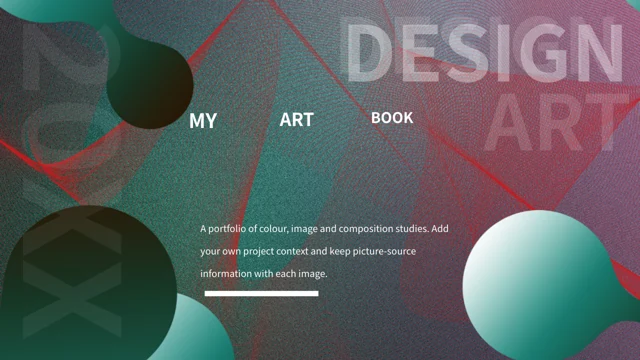
Teal Rose Sphere Portfolio Presentation Template pairs teal spheres with rose wave textures, white inset panels and thin frames. The 24 16:9 slides include an index and dividers on pages 3, 8, 13 and 19. Teal Rose Sphere Portfolio Presentation Template combines crayon and folded-paper photographs, wave pictures and a UGO poster with caption areas. Teal Rose Sphere Portfolio Presentation Template offers a six-branch diagram, circular captions, three arrow notes, an A-D sequence and three gradient cards. These are manual layouts; there are no native charts or embedded workbooks. The shaded spheres are image artwork rather than editable 3D models. Teal Rose Sphere Portfolio Presentation Template uses independent English guidance in text boxes and retains source wording in notes. Printed image words and source information remain with the supplied pictures, so the whole package is not entirely English. The last page says thank you; website languages describe the same downloadable file.
Key Features of Teal Rose Sphere Portfolio Presentation Template
Sphere artwork, pale panels and concise picture notes.
Teal and Rose Sphere Artwork
Teal Rose Sphere Portfolio Presentation Template pairs sphere pictures with rose textures. Keep the image layers distinct from editable layout shapes.
White Panels and Fine Frames
Teal Rose Sphere Portfolio Presentation Template sets pale panels over colourful backgrounds. Check small text, frame colours and contrast after editing.
Pictures with Source Context
Teal Rose Sphere Portfolio Presentation Template has crayons, paper and a UGO poster. Caption image details and retain source information with each image.
Six-Branch Visual Diagram
Teal Rose Sphere Portfolio Presentation Template has six labels linked around a centre. Match each caption to its branch; the diagram uses manual shapes.
Circles, Arrows and Cards
Teal Rose Sphere Portfolio Presentation Template has circular notes, three arrows and cards. Adapt short labels and check the reading order after editing.
Four Dividers and a Closing Page
Teal Rose Sphere Portfolio Presentation Template has four dividers and a thank-you page. Choose a sequence that explains your own portfolio clearly.
How to Use Teal Rose Sphere Portfolio Presentation Template
Choose the layouts, download the deck and refine the visual story.
-
Choose Your Picture Sequence
Review all 24 pages of Teal Rose Sphere Portfolio Presentation Template. Choose picture studies, diagrams and closing layouts that suit your work, then plan a caption and position for each item.
-
Download Your Working File
Get Teal Rose Sphere Portfolio Presentation Template with an active paid plan. Downloads have no daily limit and can be repeated; keep the original download before editing a working version.
-
Edit and Review the Portfolio
Adapt Teal Rose Sphere Portfolio Presentation Template with your own captions and context. Check fonts, picture crops, contrast and diagram labels, then review the saved pages before sharing.
Questions about Teal Rose Sphere Portfolio Presentation Template
How do I download Teal Rose Sphere Portfolio Presentation Template?
Teal Rose Sphere Portfolio Presentation Template is available to an account with an active paid plan. Sign into that account and use the download control on Teal Rose Sphere Portfolio Presentation Template. There is no daily download limit for Teal Rose Sphere Portfolio Presentation Template, and repeat downloads are allowed. Keep the downloaded Teal Rose Sphere Portfolio Presentation Template as a reference before changing pictures or captions. Review Teal Rose Sphere Portfolio Presentation Template in the editor you plan to use and choose the layouts that support your portfolio.
How is Teal Rose Sphere Portfolio Presentation Template organised?
Teal Rose Sphere Portfolio Presentation Template has 24 slides in the original 16:9 format. The index in Teal Rose Sphere Portfolio Presentation Template is followed by four numbered dividers on pages 3, 8, 13 and 19. Teal Rose Sphere Portfolio Presentation Template moves through picture studies, composition diagrams, selected details and review layouts. You can shorten the sequence of Teal Rose Sphere Portfolio Presentation Template while retaining the dividers that help explain your own work. The final page of Teal Rose Sphere Portfolio Presentation Template carries a thank-you message rather than another project example.
Are the diagrams in Teal Rose Sphere Portfolio Presentation Template linked charts?
Teal Rose Sphere Portfolio Presentation Template has no native data charts, tables or embedded workbooks. The six-branch diagram in Teal Rose Sphere Portfolio Presentation Template is made from layout shapes, lines and separate captions. Teal Rose Sphere Portfolio Presentation Template also includes an A-D sequence, circular notes, three arrow headings and three gradient cards. Edit the manual shapes and text in Teal Rose Sphere Portfolio Presentation Template directly instead of searching for a data worksheet. Keep related labels consistent when revising Teal Rose Sphere Portfolio Presentation Template so the reading order remains clear.
Can I edit the spheres in Teal Rose Sphere Portfolio Presentation Template as 3D models?
The shaded spheres in Teal Rose Sphere Portfolio Presentation Template are image artwork. Teal Rose Sphere Portfolio Presentation Template does not supply those pictures as editable 3D models. Ordinary text boxes, coloured panels and diagram labels in Teal Rose Sphere Portfolio Presentation Template can be adapted separately from the pictures. If you replace an image in Teal Rose Sphere Portfolio Presentation Template, review its crop and relationship with nearby frames. Use the supplied previews of Teal Rose Sphere Portfolio Presentation Template to compare the sphere backgrounds with the inset photo and diagram layouts.
Can I preview every page of Teal Rose Sphere Portfolio Presentation Template?
The gallery for Teal Rose Sphere Portfolio Presentation Template shows all 24 final pages in order. Review Teal Rose Sphere Portfolio Presentation Template to compare the large background spheres with the pale panels and grayscale picture studies. Look closely at the caption space in Teal Rose Sphere Portfolio Presentation Template before selecting a layout for a longer description. The source laptop photograph in Teal Rose Sphere Portfolio Presentation Template is a static picture rather than a working application screen. Check the complete saved Teal Rose Sphere Portfolio Presentation Template again after replacing pictures or moving between editors.
Which fonts does Teal Rose Sphere Portfolio Presentation Template use?
Teal Rose Sphere Portfolio Presentation Template uses Source Han Sans SC Regular and Bold for ordinary editable text. Font files are not embedded in Teal Rose Sphere Portfolio Presentation Template; install suitable fonts or choose a substitution in your editor. After a font change in Teal Rose Sphere Portfolio Presentation Template, check the narrow diagram labels and large divider numbers. Review the circle captions and arrow notes in Teal Rose Sphere Portfolio Presentation Template for unexpected wrapping. Printed lettering inside pictures in Teal Rose Sphere Portfolio Presentation Template remains image content and does not change when you edit the text-box font.
Is the whole file of Teal Rose Sphere Portfolio Presentation Template in English?
Teal Rose Sphere Portfolio Presentation Template uses independent English guidance for ordinary editable headings and captions. Teal Rose Sphere Portfolio Presentation Template retains original visible source wording in slide notes, separate from that guidance. Printed words and source marks in the pictures of Teal Rose Sphere Portfolio Presentation Template are preserved, so the package is not entirely English. A website translation of Teal Rose Sphere Portfolio Presentation Template describes this same downloadable deck rather than supplying another translated PPTX. Replace the examples in Teal Rose Sphere Portfolio Presentation Template with your own project information while keeping source references separate from your authorship claims.
How should I use source pictures in Teal Rose Sphere Portfolio Presentation Template?
Teal Rose Sphere Portfolio Presentation Template includes photographs, abstract artwork and a poster carrying UGO wording. The 699pic source information in Teal Rose Sphere Portfolio Presentation Template identifies provenance and does not establish that every picture has one creator. Do not present supplied artwork in Teal Rose Sphere Portfolio Presentation Template as your own verified work or infer an artist from a caption alone. Access to Teal Rose Sphere Portfolio Presentation Template does not grant extra rights over third-party source material. Confirm the image permissions and relevant source context before publishing a portfolio based on Teal Rose Sphere Portfolio Presentation Template.
How can I share an edited Teal Rose Sphere Portfolio Presentation Template?
Adapt Teal Rose Sphere Portfolio Presentation Template with captions and project details you can support. Review the reading order of Teal Rose Sphere Portfolio Presentation Template and remove layouts that do not serve your subject. Check Teal Rose Sphere Portfolio Presentation Template for crop changes, long labels and low text contrast after saving. Export Teal Rose Sphere Portfolio Presentation Template to PDF if your audience needs a static view, and retain the editable file for later changes. Share the final Teal Rose Sphere Portfolio Presentation Template in a format your audience can open, with source information and permissions appropriate to the pictures you use.